
Topic: Free plugins to use in Podium
- This topic has 90 replies, 25 voices, and was last updated 11 years, 11 months ago by
 Andrzej.
-
October 27, 2012 at 15:51 #22390
 alexParticipant
Me le suono! wrote:
I had fun making a short video about this plugin in Podium Free:
http://www.youtube.com/watch?v=v8vXnoOxlzQ&feature=plcp
It’s banal but I hope it can still be useful to someone!
It’s actually very basic (I suppose that’s what you wanted to say) and that’s what makes it really good (if I were a beginner that’s exactly what I’d like to see – everything’s perfectly clear and easy to understand). 8)
October 28, 2012 at 14:06 #22391October 28, 2012 at 22:13 #22392 kingtubbyParticipant
@Me le suono! wrote:
You’re welcome! You propose topics for discussion very interesting!
I had fun making a short video about this plugin in Podium Free:http://www.youtube.com/watch?v=v8vXnoOxlzQ&feature=plcp
It’s banal but I hope it can still be useful to someone! 😉
Good stuff Me le suono! Concise little tutorials like this are a real help to newcomers 🙂
October 29, 2012 at 10:12 #22394 MLSParticipant
Thanks kingtubby!
I made other videos for vocoder, autotune and arpeggiator.
The next will be… “time stretch” or “step sequencer”, maybe. 8)Greetings.
October 29, 2012 at 22:59 #22397alexParticipantIt’s really great that you do stuff like that. I’m sure they will be at least as good as the first one, and I’ve already said what I think of it.
By the way, I’ve noticed something – this thread has turned into a place where people (not all of them) throw information about all free plugins they’re aware of (some of them even admit they have never tested them). Is this really helpful ? What should a poor newbie do when he/she downloads and installs all that stuff?
For the last couple of days, I’ve been trying to make a really narrowed list of the best freeware vst plugins. And I must admit, sometimes, it was really hard to decide which one to keep from let’s say 5 or 6 great ones. But I did it. I deleted more than a hundred of them in order to keep only the very best ones (it is the matter of personal preference, I know, but only to some point, and one doesn’t need 20 eqs or compressors or whatever really, especially if 7 of them are obviously inferior to the rest of them and the other 8 are pretty much alike (maybe those eight are equally good, but do yourself a favor and choose one of them and get to know it inside out). Because, one can have too many plugins (and that can really be a problem, especially for newbies). So, after I’m done, I’ll probably post about that, because that could help unexperienced users to concentrate on making music instead of downloading hundreds of plugins (which they all will eventually do, but better later (when they already know what they’re after) than sooner :)).
Keep up the good work 😎
October 30, 2012 at 12:36 #22400MLSParticipantThanks again Alex.
I totally agree with you. I think it is more useful a list of sites to find free plugins. Then the user will choose which plugins to download and use if necessary. The important thing is to test the plugins to ensure proper operation, post impressions and report problems.
Overall, I use about fifty plugins (instruments + effects) in Podium.
I like to try different VST, but if don’t have anything more than I already have, I don’t use them.November 1, 2012 at 19:05 #22412alexParticipantHi!
epicVerb won’t load. It ended up in quarantine 3 times. Has anyone had problems with it?
Tnx and cheers
November 1, 2012 at 19:37 #22413 LevendisParticipant
@alex wrote:
epicVerb won’t load. It ended up in quarantine 3 times. Has anyone had problems with it?
You won’t like seeing this picture then 😛
epicVERB v.1.5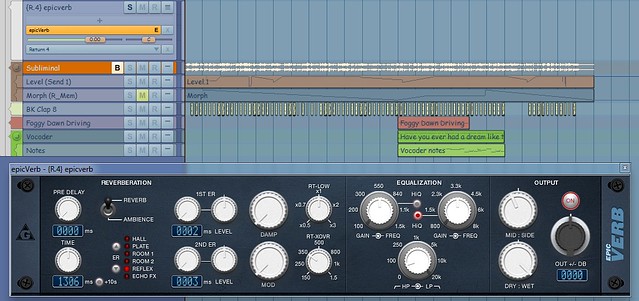
Try editing your quarantine list:
- Open the Setup menu in Podium.
- Select “Explore Setup folder“.
- Open the file named PluginQuarantine.txt with a text editor.
- Delete epicVERB’s entry.
- Cross fingers.
- Import the plugin.
November 1, 2012 at 20:03 #22414alexParticipantLevendis wrote:
Try editing your quarantine list:
Open the Setup menu in Podium.
Select “Explore Setup folder”.
Open the file named PluginQuarantine.txt with a text editor.
Delete epicVERB’s entry.
Cross fingers.
Import the plugin.Did all of that three times + prayed (even though I’m not religious).
November 1, 2012 at 20:24 #22415LevendisParticipantNovember 1, 2012 at 20:36 #22416alexParticipantYou want believe this 😯
I finally got it and it worked. Then I added the presets folder (don’t ask me why I did it) and Podium crashed. I removed the preset folder and Podium loaded the plugin again, as if it wasn’t already there. After that, the plugin started pushing the volume to infinite as soon as it received any signal or if I just touched anything on the GUI. Deleted, reinstalled, and it works again. I don’t know how the stinking presets folder can cause something like that.
edited to add:
The extra presets are in a specific format and must be converted. I don’t care to that, but maybe someone else does.
November 1, 2012 at 20:44 #22417alexParticipantLevendis wrote:
You didn’t feed your gremlins after midnight, did you?
😆 😆 😆 😆 😆 😆 😆
I already use MoVerb, thank you.
By the way, you might want to check MuVerb, if you haven’t already:
November 1, 2012 at 20:47 #22418alexParticipantMverb?
 November 7, 2012 at 00:40 #22432alexParticipant
Was just kidding, but then I found out Mverb was not available anymore. I tried martineastwood.com 😥 and KVR 😥
but ….. here it is:
😀November 7, 2012 at 08:00 #22433 kim_otcjParticipant
I had similar sorts of problems with epicVerb (and several other Variety of Sound plugins — I can’t persuade BootEQ to do anything at all). I’m using the Lexicon Pantheon II reverb these days, but for a while I was using Ambience, which I found to be pretty stable:
- You must be logged in to reply to this topic.