Hello! Not sure where should this go to, but I hope its the correct place to ask.
I’ve been trying Podium Free for about a week, and have been enjoying so far. I have it running under Linux Mint using wine, and it has been a great experience so far. Thank you for such an amazing free software.
However, there were certain workflow that I found inconvenient, which had me curious if Podium could be modified to fit my DAW habits better.
While programming the piano roll, I’ve learnt that midi notes can be stacked ontop of another one on the exact same spot and timing, which can cause the volume of the note to increase as its now played twice:
[url=https://imgbb.com/][img]https://i.ibb.co/RFgWpTm/Screenshot-from-2025-06-01-01-13-43.png[/img][/url]
(Left picture is two notes being placed side by side. On the right picture, its two notes being stacked on top on the same notes and timing)
Coming from ableton live, I found it very counter-intuitive, and I’m wondering if there’s any way to stop this stacking, and have the selected notes replacing instead of being stacked on top.
Another thing I came across was with sidechains.
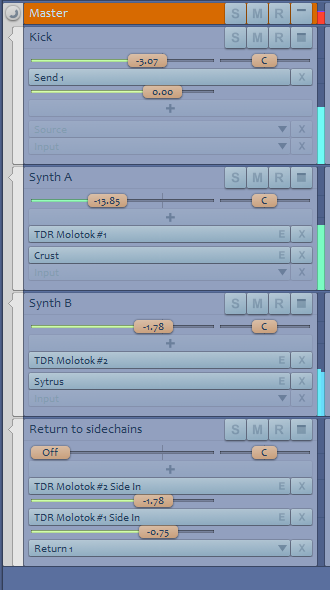
I had a kick and two synths, and intended for the two synth to have a compressor each, that takes the kick as the input. With two synths, I had to use two instance, but the instance input and output have to come as a pair. Hence, my kick ended up have two instance of sidechain inputs for my two synths:
[url=https://ibb.co/twHRGqbp][img]https://i.ibb.co/WNHChkcv/Screenshot-from-2025-05-31-01-11-58.png[/img][/url]
Is there a way for all the instance of sidechain to route to one input? So I do not need to chain multiple inputs on my kick 😀
Thanks for reading!

 .
.