
Topic: 3.1.1
- This topic has 11 replies, 3 voices, and was last updated 14 years, 4 months ago by
 Levendis.
-
April 22, 2012 at 15:41 #2736
 ZynewaveKeymaster
- Added support for Unicode file names and text input.
- The Podium file browser sorts the file list according to the current user locale.
- Added support for mice with 4-way scroll wheel.
- When key focus is in the “Note name” field in the Note Map dialog, the Enter key will activate the “Edit next” button instead of the default OK button.
- Rerendering a bounce track will truncate the bounced audio file to the length of the new bounce range.
- Fix: Adding a new track with the master track hidden would not insert the new track as a child of the master track (Bug appeared in 3.1.0).
- Fix: Pressing a track bounce button would not toggle bounce if other tracks were soloed.
- Fix: The “Adjust tempo and stretch to align grid at cursor” command could freeze if the bpm value was not enabled in the tempo event.
- Fix: Using the “Fade-In” and “Fade-Out” sound editor commands on a 32-bit fixed point file produced silence in the selected range.
April 24, 2012 at 12:38 #21730 upsParticipant
Hi, i used the new version on Win7 32bit version with an Edirol UA-25. It did not work. the audiointerface doesnt work and podium shut down. 🙁
Is this a unicodething?April 28, 2012 at 15:32 #21758ZynewaveKeymaster@ups wrote:
Hi, i used the new version on Win7 32bit version with an Edirol UA-25. It did not work. the audiointerface doesnt work and podium shut down. 🙁
Is this a unicodething?If bugs have appeared in this version, they are most likely caused by the code changes I needed to make in order to support Unicode. Unicode support as such, should not affect audio interface and plugin behaviour.
Can you tell me more about this “Podium shut down”? When does it occur? Can you open the interface dialog and try to select another audio driver?
I need much more info, to be able to diagnose why/where the bug occurs.
I have already found one bug that causes older plugins to fail during plugin scanning, but it doesn’t sound like this is the bug you’ve encountered.
April 28, 2012 at 19:23 #21762 LevendisParticipant
Thanks for the improvements, Frits.
I even noticed the new object icons’ very tactile look 🙂There is, however, a feature I miss. And that is the ‘Load Plugin Database‘ (from a template project) on the New Project Window. 🙁
p.s. Occasionally I come across mention of Podium. Here’s one on Bedroom Producers Blog.
@The author wrote:“Podium Free is without a doubt your best choice if you’re looking for a full-featured freeware DAW.”
Happy sequencing/recording/coding everybody ♫
April 28, 2012 at 20:13 #21763ZynewaveKeymaster@levendis wrote:
Thanks for the improvements, Frits.
I even noticed the new object icons’ very tactile look 🙂Thanks. Which version are you upgrading from? It seems like it’s years since I last changed the object icons.
There is, however, a feature I miss. And that is the ‘Load Plugin Database‘ (from a template project) on the New Project Window. 🙁
As far as I recall, the plugin database option has never been available when you are using a project template. Are you saying you used to have this option?
April 29, 2012 at 10:48 #21770LevendisParticipantI have updated from v.3.1.0
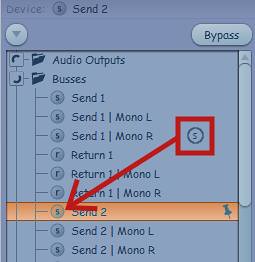 Didn’t you add a gradient to object icons?
@Zynewave wrote:
As far as I recall, the plugin database option has never been available when you are using a project template. Are you saying you used to have this option?
Yes… how strange?! I’d have to deinstall v.3.1.1 and reinstall a previous version to double check but am willing to take your word for it 😳
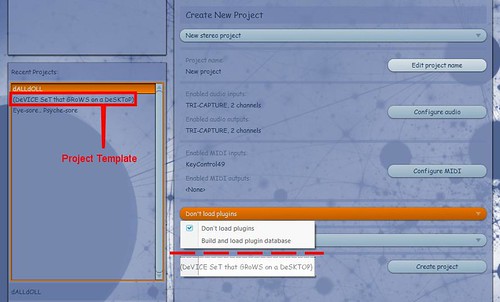 … this is the menu entry I thought was available.
p.s. My memory is not the most water-tight. I forget birthdays, what I went to the supermarket for and have a vivid (though false) recollection of travelling with Aeroflot.
April 29, 2012 at 11:17 #21771ZynewaveKeymasterApril 29, 2012 at 11:24 #21772ZynewaveKeymaster@levendis wrote:
@Zynewave wrote:
As far as I recall, the plugin database option has never been available when you are using a project template. Are you saying you used to have this option?
Yes… how strange?! I’d have to deinstall v.3.1.1 and reinstall a previous version to double check but am willing to take your word for it 😳
… this is the menu entry I thought was available.p.s. My memory is not the most water-tight. I forget birthdays, what I went to the supermarket for and have a vivid (though false) recollection of travelling with Aeroflot.
Ok, this is a standard “new stereo project”. When you said template, I thought you were using one of your custom saved templates, in which case the combobox is not available.
When the “Load plugin database” option is not available in the menu, it means Podium has not found an existing plugin database. Try the “explore setup folder” in the setup menu, and check if you have the PluginDatabase.pod or PluginDatabase_x64.pod file.
April 29, 2012 at 12:53 #21774upsParticipantIt is sad. There is not much to tell.at the first start it says it cant work and at the second start of podium podium cant find Ua-25. Maybe it ist my defaultsong, Shortcircuit2 using multi IO and SQ8l 4times plus a simple reverb as send and your EQs
@Zynewave wrote:
@ups wrote:
Hi, i used the new version on Win7 32bit version with an Edirol UA-25. It did not work. the audiointerface doesnt work and podium shut down. 🙁
Is this a unicodething?If bugs have appeared in this version, they are most likely caused by the code changes I needed to make in order to support Unicode. Unicode support as such, should not affect audio interface and plugin behaviour.
Can you tell me more about this “Podium shut down”? When does it occur? Can you open the interface dialog and try to select another audio driver?
I need much more info, to be able to diagnose why/where the bug occurs.
I have already found one bug that causes older plugins to fail during plugin scanning, but it doesn’t sound like this is the bug you’ve encountered.
April 29, 2012 at 13:05 #21775ZynewaveKeymaster@ups wrote:
It is sad. There is not much to tell.at the first start it says it cant work
What is the exact error message?
April 29, 2012 at 14:31 #21776upsParticipantthere is no specific errror message, but i tell you what i did 4 minutes ago. i installed 3.1.2. beta 1 over 3.1.1. run podium, reboot my laptop and run 3.1.2 beta 1 again. started my default song play a bit and load and song of mine and listen to it. what ever you do or did, it is fine thanks Fritz. I am happy again.
April 29, 2012 at 16:01 #21777LevendisParticipant@Zynewave wrote:
@levendis wrote:
Didn’t you add a gradient to object icons?
Yes I did! … in September 2010. 😉
😳 Noticing something after looking at it for a year and a half is so me.
@Zynewave wrote:When the “Load plugin database” option is not available in the menu, it means Podium has not found an existing plugin database. Try the “explore setup folder” in the setup menu, and check if you have the PluginDatabase.pod or PluginDatabase_x64.pod file.
Aah! Thank you, Frits. This is the first I’ve used the New Project Window since upgrading to Windows7 and installing Podium afresh. I hadn’t built the plugin database either. I’ll now paste a copy of the template project with a customised device list to the setup folder and rename it “PluginDatabase.pod”
- The topic ‘3.1.1’ is closed to new replies.