
Zynewave's Forum Page
Forum Replies Created
-
 ZynewaveKeymaster
I think even thinking of not trying something similar depending on the results with Beat is a bit strange to me. What other idea or avenues do you have in mind that can reach that many of your target market for free?
Of course I intend to contact other magazines to try similar arrangements, but the Beat cooperation will give me a sense of what to expect from such a promotion. Depending on the sales generated, perhaps creating a feature-limited version is better than giving away a full version. Or setting up upgrade rebates for the magazine readers, etc.
ZynewaveKeymaster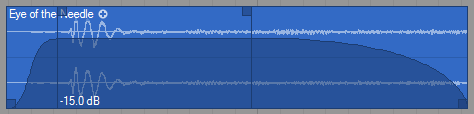
I’ve now got the fades working. After some tests I’m having doubts on how best to store the fade in/out durations. Currently they are locked to the arrangement timeline. Thus if you change the arrangement tempo, or time-stretch a sound event (not yet implemented), the fade in/out positions will move in relation to the actual waveform. Would it be better to have the fade in/out positions lock to the actual waveform data?ZynewaveKeymaster@kingtubby wrote:
Are you prepared for the inevitable flood of new-user questions in the forum Frits? 😉
I’m certainly curious to see how big the response will be. Maybe I’ll have to set up a “Deutsch” support forum 😉
The outcome of this whole experience/experiment will determine whether I should try something similar with other magazines.
ZynewaveKeymasterDoes the full special edition of Podium feature in that one or the next edition, maybe due out around the end of Nov / early DEC ?
The next one coming out early December (issue 1|2007).
ZynewaveKeymasterOr is this already part of the plan?
Extending the destructive edit features of the sound editor is not on the immediate plan.
ZynewaveKeymaster@acousmod wrote:
Another hack solution would be to always restrict channel heights to an odd pixel count, which on the other hand would result in less fluent zooming.
For me it would be a perfect solution.
As part of the ongoing work on the fade-in/out feature, I’ve now changed this so that each channel is always set to an unequal pixel height. Thus you won’t get the alternating thin/fat center line when you zoom vertically. Coming up in 1.73.
ZynewaveKeymasterHave you added the Program Change for the VST FX too ?
Could you give me some examples of effect plugins that responds to MIDI program change? (apart from Acousmodules plugins) 😉
ZynewaveKeymasterOk, I did not find anything unexpected in your project. It works as intended.
Even though your audio file playing into the reverb is shorter than the bounce event, there is no way for Podium to know that the plugin will be silent after the audio file has stopped playing. In the case of zReverb you have the tail that slowly dies out. Other effect plugins may produce audio continuously. So Podium will process the entire length of the bounce event (even if only feeding the plugin silence), because it assumes that the bounce event is set to that length for a reason. In the case of zReverb you’ll notice that once the progress bar goes past the section where the audio file is playing, the bounce render speeds up significantly because the zReverb is optimized to consume less CPU when input is silent and the reverb has died out.
Btw. The bounce render even for your long bounce event took less than a second on my machine, so it was difficult to notice any difference between a short and long bounce event. How long does your render take with the long bounce event?
ZynewaveKeymasterConquistador: If you have a project using zReverb (and only zReverb) that suffers from the slow bounce, please email it to me. I think it may be easier to understand what you’re talking about if I can see it in action.
ZynewaveKeymasterProgram change and Volume MUST exist by default for each VSTi, but also the more common Controller numbers like Pan (10), Pedal (4), Sustain (64) etc.
I don’t see any problem to have more, do you ?I can easily add more default MIDI parameters.
The only reason that I have not added more default MIDI parameters is because many synth plugins only support pitch bend and possibly modulation (CC1).
I have now added “Program Change” and “Volume” (CC7) as default parameters. ppw72: are there any more CC parameters that you use in your MIDI files?
ZynewaveKeymasterIs there a way of setting up Podium so it recognises the midi data in imported files?
Yes. Before you import the MIDI file you need to set up the proper MIDI parameters. When Podium imports MIDI files, it finds the first multitimbral instrument in the project device list, and assigns this to the tracks. In your case this must be Kontakt. You need to add the required MIDI parameters to the Kontakt device definition. Here’s how to add a program change parameter with the List window (ctrl+L):
Browse into the “Devices/
/MIDI Parameters” object folder. You should see “Pitch Bend”, “Channel Pressure” and “Modulation”. These were created automatically by Podium when the plugin was imported. Right-click the “MIDI Parameters” folder, select “New Object” and “New Parameter”. Enter “Program Change” as the object name, select “MIDI Program Change” in the type combobox, and set the “range from/to” to 0 and 127. Press OK and the new parameter is added to the parameter list. If you import MIDI files now, they should be set up with the new parameter object assigned to the program change tracks. If you already have imported MIDI files, then you can just manually assign the new parameter object to the program change tracks. ZynewaveKeymasterI have seen slow bounces before but on closer inspection it appears the longer the sound event on a New Group bounce Track the longer an offline render or bounce takes to complete. When a New Group Bounce Track is created it is created with a very long sound event. Far too long.
If the effect plugin CPU usage is constant no matter the input (even silence) then the bounce render time is proportional with the length of the bounce event.
When a new bounce track is created the sound event is set to the length of the arrangement. If you want it to be shorter just resize the bounce event. You can also press undo once after creating the bounce track. This will undo the bounce event creation. A second undo command will undo the bounce track creation.
ZynewaveKeymaster@acousmod wrote:
acousmod wrote:
If I remember well, it is on the plan ?
It looks like it’s already in Podium !No. We must do “Search in File Folder” for each file, even if they are all in the same folder.
No. Just select all the broken sound objects in the arrangement, right click the multiple selection and select “Search in File Folder”. The file folder you select will be used to search for all missing files in the selection.
ZynewaveKeymasterEven if each arrangement uses a similar or identical file, all Podium would need to do is simply replace any instance of that file wherever it is missing in each arrangement in a Project.
That’s not what I meant. Say you have two different sound files: arrangement1/beat.wav and arrangement2/beat.wav. If you now rename both arrangement folders and want to relink the files in your project, Podium wouldn’t know which beat.wav belonged to which arrangement. Thus you need to do the search for one arrangement at the time.
ZynewaveKeymasterA menu command to copy all imported/externally linked sound files into the project/arrangement subfolders is something I plan to implement.