
Zynewave's Forum Page
Forum Replies Created
-
 ZynewaveKeymaster
Yes, my explanation sounds a little cryptic when I read it again. The result of it all is:
Say that you enable the ‘sync browser navigation’ option, and you open a second browser window where you select e.g. a mixer profile. The next time you start up Podium, you just double click an arrangement in one of the browsers, and both browsers will then enter into the arrangement editor with the same editor profiles you used last.
You avoid the steps of having to select the arrangement in both browsers and then selecting the mixer profile in the second browser.
ZynewaveKeymasterDoes each window remember the zoom values and if the inspector is visible or hidden ?
The zoom settings are already stored as properties of the arrangement. The track inspector state is already stored in the setup file, meaning that it is not logged for each arrangement but is logged for each editor profile. The new default profiles are stored for each browser window in the setup file and not for each arrangement. The new changes will not affect project files at all.
Definately the option for each browser window…
I generally use one window for the embed editor, which must be synced, and another one for a global view which is better to stay static.The sync option will only sync the main object navigation in the browsers, i.e. the objects that are installed as pages in the top tabs. It will not affect the navigation within the arrangement editor, nor the embedded editors. So I think the global option will work in your case too?
I also plan to rename “sequence profile” to “editor profile”, which I think is easier to relate to.
ZynewaveKeymasterThis has been brought up several times in the past, so I thought I’d finally do something about it. The setup file now stores the last used arrangement and sound editor profile selected in a browser window. This means that if you select a mixer profile in a separate browser window, then this mixer profile will be used by default when you enter any arrangement in this browser window.
Next thing I’ll do is a “Sync Browser Navigation” option in the view menu. This option could either be a global option or stored for each browser window. If it is a global option, then all browsers will be synced when you navigate in one of the browsers. If the option is set for each browser window it will allow e.g. two browser windows to be synced, and a third browser window to not be synced. But this requires that you set the option in both browser windows, which could cause confusion. I’m more for the simpler global option. What would you prefer?
Coming up in release 1.68.
ZynewaveKeymasterThe bug was easy to find, but the fix proved to be more complicated. I had to change the method I use to set the borderless fullscreen position. Windows(tm) was doing some voodoo with the coordinates I gave it, depending on various factors such as the taskbar position. If you e.g. move your taskbar to your secondary monitor, the window is maximized properly.
Fixed in release 1.68.
ZynewaveKeymasterWhich Windows version are you using?
Do you have the ‘extend desktop on this monitor’ option set for the secondary monitor?
ZynewaveKeymasterWhat are the two resolutions you use for your monitors?
Is the size of the missing part at the bottom equal to the Windows task bar on your main monitor?
ZynewaveKeymasterThe MIDI file track will be split into separate tracks if the MIDI events on the track uses different MIDI channels. If the note on messages all use the same MIDI channel then there is no method to automatically split the sequence. You’ll have to do it manually by creating copies of the track and then use the scalpel tool to cut out the sections where the program change occurs.
September 9, 2006 at 13:01 in reply to: Restricted to Podium license ownersZynewaveKeymasterThis content is restricted to Podium license owners.September 9, 2006 at 12:45 in reply to: Restricted to Podium license ownersZynewaveKeymasterThis content is restricted to Podium license owners.September 9, 2006 at 11:45 in reply to: Restricted to Podium license ownersZynewaveKeymasterThis content is restricted to Podium license owners.September 9, 2006 at 11:08 in reply to: Restricted to Podium license ownersZynewaveKeymasterThis content is restricted to Podium license owners.September 9, 2006 at 10:51 in reply to: Restricted to Podium license ownersZynewaveKeymasterThis content is restricted to Podium license owners.ZynewaveKeymasterin any case I would love to know what exactly that parameter icon is…?
It’s a dial I grabbed from a TC Electronic guitar effect:
http://www.tcelectronic.com/VintagePedalsInstead of photographic icons I’ll try to experiment with symbolical icons. That will also make it possible to create different icons for the various preset and parameter types.
ZynewaveKeymasterThe preset icon is a MultiMediaCard flash memory. If you look really carefully at the print on the card, you’ll see that it can hold 64 MB 😆
I had a suspision that the icon would be hard to get. I just cannot think of another graphic icon that will make people go; “Ok, that’s a preset”.
How about the parameter dial icon, is that recognizable?
ZynewaveKeymasterI tried with various photographic images to represent the devices, but it’s difficult cramming something recognizable into a 14×14 pixel icon. So I settled for something simpler, which I think turned out ok:
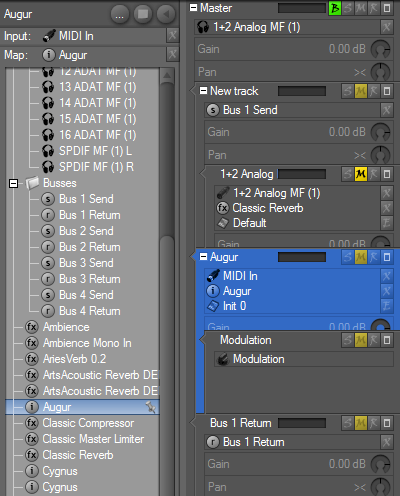
Also note that the icons for presets and parameters are updated, and that icons are shown in the track inspector panel headers. Can anyone recognize what the preset icon shows?