
Zynewave's Forum Page
Forum Replies Created
-
 ZynewaveKeymaster
@darcyb62 wrote:
Actually I think the Compact Track Layout does a decent job of simplifying things but I find the list of sends/plugins redundant with the improvements that have been made to the track inspector. All I would like to see there is the pan/gain and assortment of mute/solo/bounce/e buttons.
The problem with the list in the compact track layout is that you lose visibility once you add a couple of sends/plugins. Maybe not so important but why duplicate functionality that is handled so well in the inspector. Maybe all that is needed is the meter and buttons…
I can understand why you’d like a clean track header, if you prefer to work with the inspector and mixer. But there are others who have said they don’t like the inspector, and would prefer a way to work without it. The benefit with showing the sends and plugins on the headers is that you can see the assignments on all visible tracks. With the inspector you need to select a track before you can see the effects chain. Maybe I’ll add an option to hide the chain panels.
One thing I noticed is that if I create a new group track I cannot copy other tracks onto the group.
The track menus are not fully implemented yet. I’ll keep this one in mind.
ZynewaveKeymasterI see this is partially achieved with the new pan and level controls staying at the bottom of the track header!
Yes. The pan and gain fader are the most important controls, so removing them from the bottom of the chain panel and embedding them on the header ensures they are still shown on tracks with a partly obscured chain panel.
3- Is it me or is impossible to view the input mapping on track headers in compact mode?
This is coming later.
I think what Podianer meant to ask is why the fader doesn’t move on the middle of the line, as on a real mixing board.
Yes, I misunderstood him when first reading his comment. I have since moved the line down to the middle of the knob. The reason the slide was at the top of the knob was to allow text to be written on the area where the knob moves, like it’s done in the mixer. I have since decided not to write dB labels on the fader background.
Thanks for the feedback.
ZynewaveKeymaster@estwing wrote:
I’m not sure if the compact view in the inspector is useful to me,the commands to move tracks are precise but I generally drag them around the main screen (and use “undo” when i drop them in the wrong place)
That’s cool. You can just hide the group panel in the inspector view menu. But what about the new compact track headers, with the list of sends/plugins and the pan dial and gain slider. Is this useful to you?
Thanks for the feedback.
ZynewaveKeymaster@kingtubby wrote:
I’m generally in favour of the direction Frits is taking with this, though I have to agree at the moment it is looking a little complex.
Please be more specific. What is “it” that is looking complex?
One thing that is starting to bother me though is the fact that the options and settings are all over the place. It can be a bit of a trial trying locate particular settings. Would it make sense and/or be possible to have it all located under one menu/sub menus?
Please give me an example. Are you talking about the different dialog windows for the editor profiles?
ZynewaveKeymaster@darcyb62 wrote:
I haven’t spent much time with Podium for the last while but have been keeping tabs and the one thing that comes to mind, is that as Podianer has said, it seems to becoming more complex. For somebody just getting into Podium, there is a rather steep learning curve that some people just never seem to get. In fairness without having spent much (any) time with the beta I’m not sure if there adding or removing complexity.
I sure hope that it is removing complexity. That is the whole point of the new compact mode. If you look at the latest screenshot I posted, I would appreciate if you could specify what it is that seems more complex. Is it the embedded list of sends and plugins? In other hosts you would typically have an “FX” button, which when pressed will open a window with the list of inserts. I think it is an advantage to have the list shown on the track header for easy access. If you don’t want it, you just size the track smaller until the panel disappears.
Eventually you will be able to do all major tasks on the track headers. You can ignore the track inspector and the mixer completely if you e.g. just want to record guitar, vocals and set up a few drum and synth plugin tracks. Users that work with a large number of tracks may prefer the overview you get by working in the mixer.
ZynewaveKeymasterThe new fader looks good, but why is the horizontal line at the top of the fader button?
The horizontal line is what keeps the fader knob from falling to the bottom of the screen :wink:. It’s similar to the design in the mixer. There need to be an indication of the extent that the fader knob can move. I’ll try with a shadow frame instead.
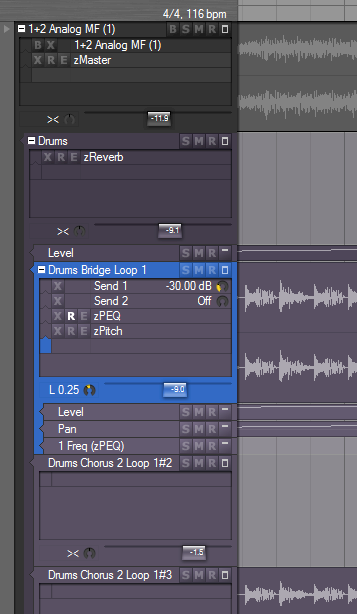
ZynewaveKeymasterI’ve experimented with removing the pan and gain dials from inside the chain panel, and instead show them as dial and fader controls at the bottom of the lane header:
I would appreciate a little more user feedback, so please post your comments. Apart from the handful of people who have already responded, I have no idea whether the rest of the userbase thinks the new compact layout mode is a waste of time.
ZynewaveKeymasterPerhaps is this due to undos or temporary files, I don’t know.
That is a good guess. What have you set the maximum undo levels to in preferences? If this is very high, then each edit action will take up some memory, and if the edit involves destructive sound editing then the cache files will increase. As a test, next time you run into problems, try to temporarily set the undo levels to zero in preferences and then back up to your preferred amount. This will clear the undo history.
ZynewaveKeymasterOh, I have crashes rather often so I am used to !
😯 Is that Podium that crashes for you, or plugins?
With a sine test signal, the sound is clean when there is no amplitude change but there is a noise (like a zipping noise) as soon as it changes.
So with a normal sound there is always the noise.If you bounce the master, is the zipping noise present in the bounced recording?
The zipping noise occurs both when using expanded and compact modes?
Is the Podium CPU indicator behaving differently between 1.94 and 1.95 beta?
ZynewaveKeymasterFrits, do you think that it is safe to use the beta for working on my current project ?
So far there are no changes to the .pod file format. There may still be bugs in the beta, so remember to keep a backup of your original project file, and save to backups often.
ZynewaveKeymasterBeta 5 is uploaded. Bus send tracks are now shown on one line instead of two. Plugin tracks have a “R” button for recording plugin editor automation. Also fixed a small graphics bug in the chain panels.
ZynewaveKeymasterFor me there are two features that would make this “complete”: 1. adding “fx track” inside the track header’s panel and 2. being able to drag and drop the fx tracks in the track headers
1: There is already a “new effect track” command if you right click a track in the chain panel.
2: This is coming later.Thanks for the feedback.
ZynewaveKeymasterBeta 4 is uploaded. This has the chain panels on the track headers in compact mode. There are still some inconsistensies between the old track header menu and the chain panel context menus. That’s what I’m working on next. I’m also going to reduce bus send tracks to only occupy one line in the panels.
The embedded chain panels is a rather big feature I think, so please post comments.
ZynewaveKeymasterThe zPEQ track under send 2 in your image is inside a track chain panel but it is one of 3 tracks inside that track chain panel that is graphically sharing that waveform to the right, or sharing the same audio track.
I’ve just hidden the bounce track lane as an experiment. You weren’t supposed to pick up on those details :wink:. The bounce sound event is still on the hidden lane. I’m thinking of a method to paint the bounce sound as a background image on the drum lane, once bounce is activated.
ZynewaveKeymasterif I converted the zPEQ track (under “Send2”) into a bounce track how would Podium draw that waveform if I wanted to bounce that zPEQ track (tap from that point in the tree) in real time? Would it overwrite the audio file to the same track in your screenshot?
Maybe I misunderstood you. If you insert a bounce track it will be shown on a separate lane, effectively splitting the chain into two halves on respectively the bounce track and the original track. I’m still thinking about methods to avoid having the bounce sound on a separate track.
So…GP (Group Panel) for the whole picture of the tree and management of all parts of the tree (all tracks) while the new “Track chain panels” in track headers are for per track micro management of tracks at track level.
Would that be a suitable summary of all the key changes in 1.95 so far in simple terms?
Yes.