
Zynewave's Forum Page
Forum Replies Created
-
 ZynewaveKeymaster
To help with the testing, I’ve created a new “Control Surfaces” chapter in the guide:
http://www.zynewave.com/wiki/doku.php?id=guide:control_surfaces
This must be the first time a feature is described in the guide, before it is available in a release 😮
July 15, 2007 at 14:58 in reply to: Restricted to Podium license ownersZynewaveKeymasterThis content is restricted to Podium license owners.July 15, 2007 at 14:47 in reply to: Restricted to Podium license ownersZynewaveKeymasterThis content is restricted to Podium license owners.ZynewaveKeymaster@H-man wrote:
If sitll relevant, I would be happy to test the BCF2000 in Mackie emulation mode on both systems.
Hi,
The first beta didn’t work for swindus, so I’m currently changing the system for auto-detection of control surfaces. I’ll email you a new beta later today.
ZynewaveKeymasterIt’s on the list, but I’m currently focusing on developing the track management. Later on I’ll get back to working on events.
Question:
When you move an event away from another crossfaded event, I assume you want the fade in/out on both events to be reset? (not just the selected/moved event).ZynewaveKeymasterThis is fun 🙂
I’ve now completed the basic part of the MCU support. Still to be developed are various assignment modes, where the MCU V-Pot channel panners are swapped to control different settings such as sends, plugins, bounce, etc.
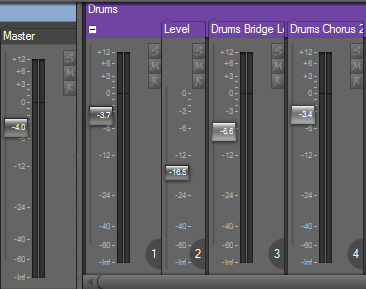
This screenshot shows the new channel indicators which will appear at the bottom of each strip that is controlled by a control surface fader. The fader knobs will also light up when you touch a fader on the MCU (similar to when you grab a fader with the mouse).
I’m curious to know if this implementation will work with e.g. BCF2000 in Mackie emulation mode. Anyone interested in receiving a beta to test with?
ZynewaveKeymasterThis has been requested before by Podianer, so it’s on the todo list.
ZynewaveKeymasterHi Chris,
Welcome to the forum, and sorry for the delay with the license. Good thing you posted about this. I normally receive an email from share-it when an order has been placed. It turns out that my website host provider has turned off automatic email forwarding due to excessive spam emails (without notifying me) which means I didn’t receive any emails from my accounts at share-it and paypal. This is now fixed.
Frits
ZynewaveKeymasteris there a keyboard shortcut to move focus between a track and the inspector
Tab.
ZynewaveKeymasterClick the pin button at the top of the preset panel.
ZynewaveKeymasterYou can try with a different color scheme. The map fields are highlighted when you move the mouse over it.
ZynewaveKeymasterIt’s deliberate that is omitted from the track context menu. However, if you left-click on the map row in the mixer, you will get a device menu. I’m probably going to extend this to the group panel in the inspector, and maybe also to the mapping box in the track lane header.
July 7, 2007 at 17:49 in reply to: Restricted to Podium license ownersZynewaveKeymasterThis content is restricted to Podium license owners.ZynewaveKeymasterOk, I misunderstood your first post. The problem you pictured is probably related to the beginEdit/endEdit support of the plugin. We’ve discussed this before:
http://www.zynewave.com/forum/viewtopic.php?t=345With plugins which have no GUI or when it is very simple, it is less annoying, because we get only the first jump from the default value to the current value (like at the begining of the first curve).
The Podium generic plugin editor implements the beginEdit/endEdit calls, so clicking and dragging a plugin control in the Podium editor does not result in erratic value jumps as long as the mouse is held down.
ZynewaveKeymasterI tried simulating this with my interface but I could not recreate the problem. I’m testing with 1.77 CM.
To figure out what the problem is, I need you to send me your Podium.ini file and a small project file, saved with the incorrect MIDI interface names.