
Zynewave's Forum Page
Forum Replies Created
-
 ZynewaveKeymaster
- Mixer redesign.
ZynewaveKeymasterHow does the heirarchal structure do things like parallel bus compression, like, on a drum track?
What do you mean with “parallel bus compression”? Side-chaining?
For things like routing, is that all done in the mixer part, or on some part of the “heirarchy” for lack of a better term?
The signal routing is defined by the visual layout of the track hierarchy. Everything flows from the bottom of the hierarchy towards the topmost master track. You organize the hierarchy in the tracks region, by dragging tracks or by using the commands in the track menu. The mixer currently does not support dragging tracks, but I’m working towards that.
ZynewaveKeymaster@sam c wrote:
my thoughts are; it may be more effecient for the current design but it is too much information in a confined space that looks like clutter!
sorry i do not have any thoughts on improving it but i will look at it again later.
I’ll appreciate any feedback on how to improve the layout. Clutter is something I definitely want to avoid.
The row buttons allow you to select the elements that are shown. Here is an example where the map and preset rows have been deselected, for when you want to concentrate on mixing levels only:
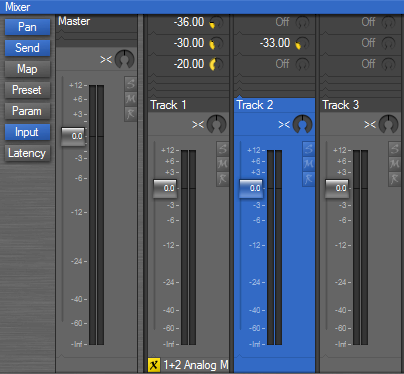
This also shows the input row at the bottom and the signal flow arrows I mentioned earlier.
ZynewaveKeymasterRegarding the statement above…if we want to will we still be able to?
Yes. Pressing the H key (or using the menu) will still toggle display of the mixer strip for the track.
What purpose will the Send button (under the Pan button) on the left of the screen serve now, possibly to hide / show the new send locations?
It shows/hides the send dials on the bus send headers. Hiding these can save some space when you are not adjusting send levels.
Will it be possible to hide / show all track headers?
The “compact headers” option is still available in the mixer view menu.
In the image above… your have “Voxengo SP” (instead os Voxengo Span) and “Classic Master Li” which sounds like some sort of kung fu grand master or something fighting off 10 men all by himself (instead of displaying the full name Classic Master Limiter).
Of course being able to extend the width of these strips would be an option but…if that is a problem at least a tool tip could appear when the mouse cursor hovers over a name in the track header. This could show the full track name.
Tooltip popup of the full name of the track and any objects assigned to it, is already on the plan. That’s why I’m moving the bypass/edit buttons from the right edge to the left edge of the strip. The tooltip popup will thus not obscure the buttons.
Since the last screenshot, I’ve attached arrows to the top of the headers, similar to the arrows in the tracks region. I’ve also moved the input and latency rows down at the bottom of the mixer, which further emphasizes the bottom to top signal flow.
ZynewaveKeymasterThe latest mixer redesign (coming up in 1.86):
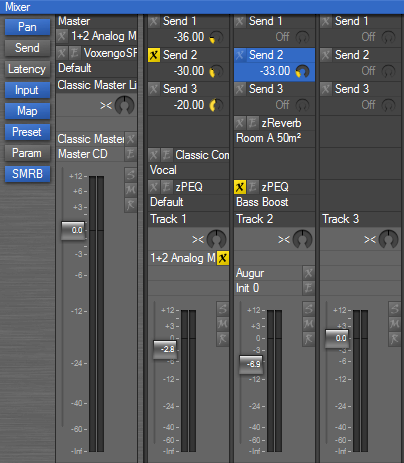
This shows the new extended track headers in the mixer. They now contain controls for mappings, presets and send dials. This is more space efficient for the bus send and effect insert tracks. There is no longer any need to show the mixer strip for these tracks, unless you want to check the meter of the track output.
I’m considering moving the map, preset and param rows on the mixer strips up to the mixer header as well.
Thoughts?
ZynewaveKeymasterMidi Time Code is on the list already, but my question is: “How soon?”
That’s difficult to say. I’ll probably look at it when I begin implementation of control surface support. Hopefully within this year.
the dragging/exporting of midi sequence events to the list at the right, which should save that parts as midi files
I’ll keep that in mind.
ZynewaveKeymasteri would like to be able to change the name of a project by right clicking in the project list , actually the only options are open and remove
The project name is stored in the project file, so renaming the file is not enough. You’ll need to open the project, edit the name in the project properties dialog, and then resave.
ZynewaveKeymasterFinally, how easy is it to “copy,” “ghost,” or whatever the term is, a MIDI clip throughout the next x# measures or so? In creating a (rock) drum part, for example – with the Drum Editor – it makes more sense productively to just create one measure if the next 15 are all the same and then just copy them forward, if you know what I mean.
The quickest way to do this: Select the one-measure sequence event in the arrangement editor, and press the Insert key for each “phantom” copy you want to append. If you want to paste a large number of copies, you can hold the Insert key and let auto-repeating kick in.
ZynewaveKeymasterDo you simply drag another one from the map onto another track?
That’s what you do in the case of insert mappings. With global plugins (i.e. plugins that have multiple mappings for a single instance), you need to create a set of mappings for each instance you want to use. Right-click the folder or any of the mappings for the plugin in the project start page device list, and select “New Instance”.
is the “track” NOT the whole horizontal strip?
A Podium “track” has a dual purpose. It can function as a standard track with a track “lane”, but also works as a modular connection of the MIDI/audio flow. Inserting tracks without a track lane is mostly used to set up a chain of bus sends/plugins.
May 2, 2007 at 16:54 in reply to: Restricted to Podium license ownersZynewaveKeymasterThis content is restricted to Podium license owners.ZynewaveKeymasterI’ve had McAfee On access statistics window open and guess what…
Everytime a spike occured On Access scanner changed it’s last file scanned and upped it’s total number of files scanned.
I have a very string feeling that this is the cause.I think you’re right. It’s most likely the scanner file access that temporarily blocks the Podium audio thread.
ZynewaveKeymaster“Sensible” in what way?
You describe some of the problems in your post. I’m guessing that what you really want numbers for, is track lanes and not tracks in general. Since you can show/hide the track lane with a shortcut, how should this affect the numbering of the tracks? Should the track numbers be assigned to a track when created, or should it automatically adjust according to changes in the track hierarchy?
ZynewaveKeymasterIt’s tricky to make a sensible numbering due to the hierarchic organisation of the tracks.
Personally I dislike using numbers to identify tracks, but I know some prefer to have numbered tracks. I’d rather organize tracks under group tracks to get a better overview in arrangements with a large number of tracks.
ZynewaveKeymasterTried dropping latency in drivers down to 4ms.
Seemed to make no difference on spikes or on avg of CPU monitorDo the spikes occur less frequently, if you increase the latency/buffer size?
Do the spikes occur more often if you move the mouse or press any keys?
BTW: Are onaccess virus scanners known to cause issues?
Not that I’m aware of. But try to temporarily disable it, to see if this has an effect.
After you have had a few spikes, go to the report page in the interfaces dialog, and save a report. Paste the report here or email it to me.
ZynewaveKeymasterI’ll consider hiding the gain/pan dials in the mixer, instead of just dimming them. I’ve also forgotten to indicate dimmed state of the recently implemented gain faders, so hiding the faders seems like the least confusing solution.