
Zynewave's Forum Page
Forum Replies Created
-
April 14, 2007 at 12:14 in reply to: Restricted to Podium license owners
 ZynewaveKeymasterThis content is restricted to Podium license owners.ZynewaveKeymaster
@duncanparsons wrote:
@wanyze wrote:
I did some Orchestral stuff in the past using Cubase, which use alot of midi parameter automation to make it sound alive. Despite the fact that there are alot of midi controllers missing in Podium which cannot be automated (which should come soon), I find it quite time consuming to work with alot of midi automation data in Podium.
most of these can be added as parameters – there is full support for CC, RPN, NRPN, etc… which controllers are you missing?
DSP
I think wanyze refers to a reply I made recently, about making it easier to create new MIDI parameter objects directly from the inspector parameter panel. Just now I’m working on adding a menu button to the parameter panel, with a “New MIDI Parameter” submenu listing all MIDI parameters not already created. If you have a synth that e.g. supports sustain pedal (CC64), you just select it from the menu to create the parameter object for the device.
April 13, 2007 at 21:05 in reply to: Restricted to Podium license ownersZynewaveKeymasterThis content is restricted to Podium license owners.ZynewaveKeymasterYou can’t do this in one editor window currently. At some point I’ll probably add the capability to edit several curve sequences in one window, but currently there are other more important things on my list.
April 13, 2007 at 14:39 in reply to: Restricted to Podium license ownersZynewaveKeymasterThis content is restricted to Podium license owners.April 13, 2007 at 14:34 in reply to: Restricted to Podium license ownersZynewaveKeymasterThis content is restricted to Podium license owners.ZynewaveKeymaster1. In an arrangement with only audio tracks and probably one instance of LUXONIX LFX-1310: While dragging a sound event, I got the following error message:
Did the crash occur while you were still dragging the event, or upon release of the mouse button? Please see if you can reproduce the crash. I doubt it has anything to do with the Luxonix plugin. Although if you search for “Luxonix” on this forum, you’ll see that there have been some problems with the LFX-1310.
2. In an arrangement with just an instance of Wusikstation: While closing the plugin, I got the following message:
Is that the latest version of WusikStation? If you have a multiprocssing machine, try disabling the “plugin multiprocessing” option in the Preferences.
ZynewaveKeymasterThe “export stuff” to an external library is probably something I’ll look at in the distant future, but currently there are a lot of items that have a higher priority.
ZynewaveKeymasterSo will my my Analysis track and Pre Master Track show up in the new dock master chain?
Yes.
Is it user configurable?
Yes.
Would we also be able to dock the new master chain on either side of the mixer?
Yes.
ZynewaveKeymasterMTC support is on the future plan. There are quite a few features that have a higher priority, so I cannot say when it will be implemented. I’m not aware of any VST plugins that can sync to MTC via a MIDI port.
ZynewaveKeymasterSo, is this how it would look like in the end in the mixer view?
Both the master chain and bus return docking can be set to either left or right side.
So If I select Track12 (which would be out of view because it only fits lets say 6 panels in a row for example), the middle range would scroll by itself to its end and highlight Track12?
The mixer currently does not autoscroll to always keep the current track in view, but I could add an option for this. The docked bus returns would always show all bus return groups, so no scrolling needed for this section.
ZynewaveKeymasterSometimes I can’t find the selected mixer panel since I used many tracks and then scroll to the end to adjust the Sends/Returns.
If a Bus is selected, it could display all tracks which send any amount to it.This gave me an idea for a mixer docking feature. I’ve added a “dock master chain” option to the mixer:
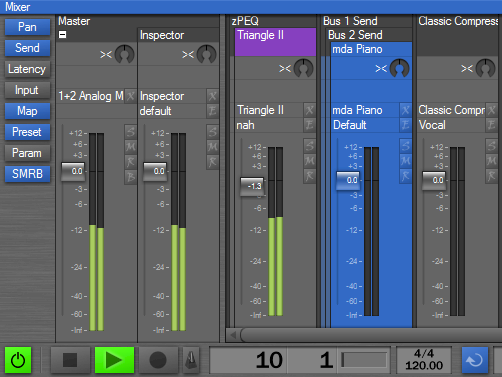
This has a couple of benefits: The master output section is always visible no matter what audio tracks are shown in the scrollable section. Having the master chain separated also saves the space for the master group headers above the regular audio tracks.
I’m going to experiment with a “dock bus returns” option, which similarly separates any bus return track chains from the scrollable section and docks them at either right or left side.
Useful?
April 6, 2007 at 11:09 in reply to: Restricted to Podium license ownersZynewaveKeymasterThis content is restricted to Podium license owners.April 6, 2007 at 11:03 in reply to: Restricted to Podium license ownersZynewaveKeymasterThis content is restricted to Podium license owners.April 5, 2007 at 23:46 in reply to: Restricted to Podium license ownersZynewaveKeymasterThis content is restricted to Podium license owners.