
Zynewave's Forum Page
Forum Replies Created
-
 ZynewaveKeymaster
The “Search in File Folder” menu command was added in Podium 1.68, and in the latest 1.72 it was added to the guide:
http://www.zynewave.com/wiki/doku.php?id=guide:project_start_page#arrangements_sounds_panel
Your next question may be; “Why is there no “Search For Missing Sound Files” menu in the Arrangements & Sounds panel menu?”. Because each arrangement in a project may have similarly named sound files placed in different arrangement subfolders. So you need to select the broken sound files for one arrangement at the time, and direct the search to the proper subfolder for the arrangement.
ZynewaveKeymasterI don’t like reading on the screen, I much prefer paper manuals so I guess I’ll have to continue making my own
The Wiki guide is already included as a PDF in the Podium installation. What Conquistador tried was just making a more presentable layout with a table of contents etc.
The Podium Guide PDF can be opened (and printed) from the Podium View menu, or through the “Zynewave” group in the Windows start menu.
ZynewaveKeymaster1. The image above does not appear to adjust graphically to the fade on the right. Graphical changes to an audio object when making volume changes and fades was discussed eariler in this thread…is that feature not going to be included in the new fade feature? Or is it just a very early screen shot?
The first release will not scale the waveform.
2. Will Podium also have handles that allow for an event Midi or Audio to be resized?
Note and curve sequence events will have the bottom corner size handles.
Taking it further, maybe even dragging out mulitiple copies of a file as in ACID?
Maybe in a later release.
ZynewaveKeymasterFar too much work considering the Wiki is already there. A duplication of efforts really.
That was what I feared would be the case. As far as editing goes, the Wiki is the simplest solution as I see it. Thanks for your efforts.
ZynewaveKeymasterI think the fade curve appearance is done now:
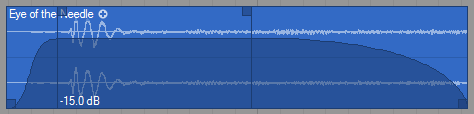
The draggable handles and the fade curve is only displayed when the mouse is placed over the event (also unselected events). The darker translucent curve body is only drawn when the mouse is placed over the fade in/out handles or over the horizontal gain bar. Otherwise only the curve outline is drawn without the darker body. This helps as a visual confirmation that any mouse click action will influence the fade curve and not start dragging the event.
The screenshot shows the mouse placed over the horizontal bar which can be seen by the -15.0 dB at the bottom. When the mouse is over the fade in/out handles the fade time is written at the bottom.
Still no estimate on when it is ready, but I hope it can be included in the next 1.73 release.
ZynewaveKeymaster- Bug fixes.
ZynewaveKeymasterHi soundquist,
Use the “Import file…” menu on the project page or drag the MIDI file onto the project page (not onto tracks). This will create an arrangement with all the tracks in the MIDI file.
Frits
ZynewaveKeymasterThe thing is I have no problems anywhere else on the net when logging in to a site.
I can’t think of anything within my control that can affect this. I’m using the latest and unmodified phpBB forum software. Are you registered on other phpBB forums?
ZynewaveKeymasterDoes the same thing happen if you click the “log in” link at the top and login there instead of at the bottom of the main forum page?
I had a problem a while ago, which caused my login to become invalid after a few minutes. This happened because my IP address was dynamically changed by my internet provider. I don’t think that is your problem, because the problem should be present with IE as well.
ZynewaveKeymasterWhat do you mean with impossible to log in: Does the forum page not load, or do you get an invalid password message, or is it something else?
ZynewaveKeymasterwhen will we be able to contribute to the wiki?
You can do this already. What you suggests sounds like a tutorial, so you could add your own tutorial page in the wiki. It’s also possible to upload media files to the wiki, which you then can link to on the tutorial page. Take a look at how the existing tutorials are set up. If you need assistance, just ask.
ZynewaveKeymasterWhat will be the restrictions?
No restrictions. It is a identical to a full version, except that zReverb is not included. The splash screen will show “Beat Edition” and possibly a Beat logo will appear in the UI. The Beat Edition will not be updated, so Beat users will need to purchase a license to get access to new Podium releases. They have created a Podium workshop article which should be in the mag as well.
ZynewaveKeymasterFrits, will fades make it into the next release?
Still too early to tell. Probably two more weeks of work is needed.
ZynewaveKeymasterBut if there is a volume value visible somewhere on the event, we can see if it has been amplified or not ?
Yes. I think the best solution is to let 0dB be at the top edge of the event.
ZynewaveKeymasterOf course, when the volume is superior to 0db, the horizontal volume / fade line stays at the top of the event, but the waveform, including the fade zones, is scaled according to it.
When dragging to the bottom, the line goes below the top only when the amplitude value is negative.Is this the best solution in your opinion? How about mapping the -48..+12 range to the top 2/3 part of the event, and drawing a faint horizontal line at 0 dB (which would be ~1/8 from the top)?
I agree that it makes most sense to set 0dB at the top of the event, but it makes it harder to distinguish fade curves that goes above 0dB.