
Zynewave's Forum Page
Forum Replies Created
-
 ZynewaveKeymaster
Frits, will fades make it into the next release?
Still too early to tell. Probably two more weeks of work is needed.
ZynewaveKeymasterBut if there is a volume value visible somewhere on the event, we can see if it has been amplified or not ?
Yes. I think the best solution is to let 0dB be at the top edge of the event.
ZynewaveKeymasterOf course, when the volume is superior to 0db, the horizontal volume / fade line stays at the top of the event, but the waveform, including the fade zones, is scaled according to it.
When dragging to the bottom, the line goes below the top only when the amplitude value is negative.Is this the best solution in your opinion? How about mapping the -48..+12 range to the top 2/3 part of the event, and drawing a faint horizontal line at 0 dB (which would be ~1/8 from the top)?
I agree that it makes most sense to set 0dB at the top of the event, but it makes it harder to distinguish fade curves that goes above 0dB.
ZynewaveKeymasterMany thanks, acousmod 🙂 That’s a great help.
– the wave representation doesn’t follow the fades
So far this applies to Podium too. Can’t it sometimes be a disadvantage that the waveform is scaled according to the fade curve? If you are working with a sound event that you have reduced by -24 dB, there won’t be much waveform left to help you in finetuning the fade-in/out.
– selection of the curves in a popup window when double clicking a fade
Do you mean that the hosts do not support the popup window, or do you mean its a disadvantage that you need to open a popup window rather than a right-click menu?
+ the volume can be dragged with a positive dB value
For now I have set the limits for the event gain to [-48 .. +12] dB, the same as the track gain setting.
And all the other tools too I suppose ?
Not so far. I see no point in showing the fade handles if you have selected e.g. the eraser tool.
It seems most hosts support vertical dragging of the fade curve to set the level, so do you think this is the way to go?
ZynewaveKeymasterIs the blurred background image a screenshot of Podium?
To be honest, I’m not sure I like this better than the existing splash screen. But I would like to hear more opinions.
ZynewaveKeymasterExperiment with draggable handles on the sound events:
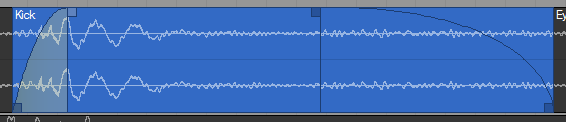
The screenshot shows the fade in handle clicked and being dragged (mouse cursor not shown). The bottom handles will resize the event. This works identically for the select and pencil tools. The handles and fade curves are only shown when the mouse is hovering over an event.
Next step is finding a method for displaying and dragging gain and pan for the event. Dragging the fade-in handle up/down could be used in some way, but I would prefer the fade-in/out boxes are always aligned to the top of the event. The gain/pan values should be written as text either overlaid onto the event or below the event. Perhaps I could show two dial controls next to the values. Any ideas?
ZynewaveKeymasterInteresting xis23. I had no idea Podium could do this 😆
ZynewaveKeymasterGood suggestion. Not a high priority though, so you may have to remind me early next year. 😉
ZynewaveKeymasterthe splashscreen, with the black border, which makes me think of a mourning announcement.
Really? 😯 Anyone else feel depressed when they see the splash screen? 😕
Naturally I don’t make that connection. Is it because the background is greyish? Or is it the black border? What could be done to improve it?
I got tired of the old green colored icons and splash screen. The new design uses the brushed metal texture that was recently introduced in Podium.
ZynewaveKeymasterI would like to see automatic crossfades but with the ability to further edit the crossfade curves as you show with the fade controls.
How I imagine automatic crossfade would work: When you drag a sound event to overlap another event on the same track, the fade in/out times of the two events will be set to the overlapping interval. The fade out curve of the first event will then be inversed and assigned as fade in curve of the second event. This crossfade will be applied as a separate edit in the undo history. If you don’t want the automatic crossfade you just press undo once. Pressing undo again will undo the event move.
ZynewaveKeymasterPerhaps if it was an option you could turn off/on in the window options?
If you don’t create any templates in the dialog, then the submenu won’t appear.
ZynewaveKeymasterwill there be a graphical way of doing this for instance just clicking on an audio clip and say dragging in a fade quickly via a drag box or with a key+click combo?
I haven’t implemented that yet, but that is the plan. Would it be sufficient to be able to drag the fade in/out times directly on the event? To edit the curve shape you would then need to open the properties dialog (Shift+Enter).
I was also considering extending the fade properties dialog with a listbox where you could create and manage defaults/templates. This list would then be available as a submenu when right-clicking the event, to quickly recall various curve shapes. But maybe that would be overkill?
October 22, 2006 at 22:58 in reply to: Restricted to Podium license ownersZynewaveKeymasterThis content is restricted to Podium license owners.October 22, 2006 at 10:51 in reply to: Restricted to Podium license ownersZynewaveKeymasterThis content is restricted to Podium license owners.October 22, 2006 at 08:54 in reply to: Restricted to Podium license ownersZynewaveKeymasterThis content is restricted to Podium license owners.