Zynewave's Forum Page
Forum Replies Created
-
 ZynewaveKeymaster
But how can I reorder the objects in the devices panel without switching to the “old” look?
I’m going to add this for the next release, along with commands for adding folder objects.
ZynewaveKeymasterOne problem though. The vst scan hangs on Real Guitar 2.dll
Do you mean to say this is a problem with the new project creation, or did it hang in the project wizard of the previous releases as well?
ZynewaveKeymasterOkay… One thing that’s missing. I can’t add a plugin from the new page…
In the intial screen shot you provided there is an icon which I believe would open a menu. It’s not present here.
@Zynewave wrote:
I’ll continue adding some features for the next release, such as:
Menu button at the top of the devices panel with plugin scan and import, as well as some of the other options found in the project wizard.
😉
ZynewaveKeymaster1.66 is released with the first stage of the project start page. I’ll continue adding some features for the next release, such as:
Menu button at the top of the devices panel with plugin scan and import, as well as some of the other options found in the project wizard.
Possibility to create new folders in both arrangements and devices list, and dragging objects around like in the list window.
Context menu on arrangements with ‘duplicate’ commands for the entire arrangement or just the track layout.
Other suggestions?
ZynewaveKeymaster- Project start page.
ZynewaveKeymasteri had crashes when i press Alt+crtl+shift+s while podium is playing
Saving a sound will lock the data for the duration of the save, so if the sound file is big the engine goes silent after a second or so while the ‘saving sound’ progress dialog is being displayed. I just tried this with a simple arrangement and a single 140 MB sound file. The engine goes silent during the save and then plays again after the save. I could not provoke a crash. To reduce the risk of this sort of crash, Podium could stop playback before saving any sounds, but I’d rather avoid having to put in that restriction. Let me know if it happens again.
ZynewaveKeymasterAnd when will we see fades and levels on audio clips ?
Don’t worry, I’ll get back to that. As I said in the first post, I felt a need to do something on the UI, as a break from the low-level stuff.
ZynewaveKeymaster@Conquistador wrote:
Did I say how much I like the new page designs? 😆 Fabuloso!
 😀
😀 For added coolness, wait until you see the pulsating create button 8)
ZynewaveKeymasterHow will this work with the Devices and Arrangements and Sounds columns or pages in your original screenshot?
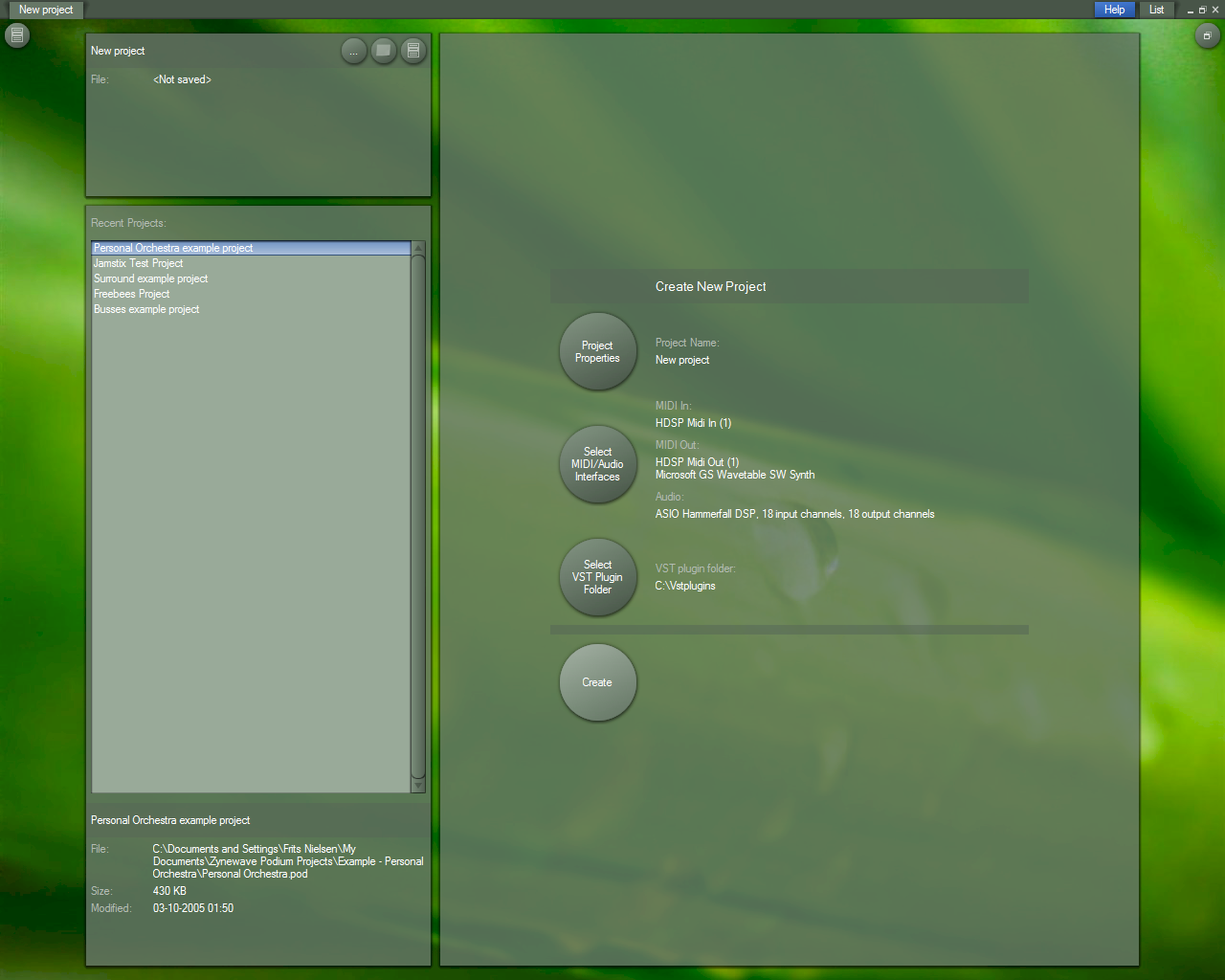
The ‘create new project’ page will appear instead of the arrangement and the devices column when the project is empty. That happens when you use the ‘new project’ menu or when you delete all objects in the project.
Also is this the screen that will greet users who click on File > New project?
Yes.
Frits, you really should consider changing the default color scheme to the dark grey one you obviously like very much (I can tell that by the look at the screenshots you post here ). It looks much more expensive and stylish. just imho.
I’ve thought about that. Actually the color scheme used in this screenshot is dark green to match the greenish wallpaper. But the dark grey normally goes better with most wallpapers.
ZynewaveKeymasterI’ve added a ‘create new project’ panel, that will replace the ‘quick setup’ command in the project wizard.
Here’s a fullsize screenshot:
ZynewaveKeymasterHowever, specifically regarding the GM compatible drum-kit preset names that Podium creates, I would like to be able to rename the individual drum hits as displayed on the left of the drum sequence editor window as clicking on the names triggers the drum sound, thereby making it easy to match the drum sound to the name I wish to assign to it.
I’ve added a ‘Drum Preset Properties’ context menu when you right-click on the drum line in the editor. Coming up in 1.66.
ZynewaveKeymasterIt has a JCM900(in) and JCM900(out)…
It doesn’t need to be in two separate mappings. I downloaded and tested it, and it turns out Podium fails to recognize it as an insert plugin because its mono in AND mono out. Release 1.66 will import it as an insert plugin.
You can convert the two global mappings into one insert mappings like this:
Enter the properties dialog for one of the mappings, remove the in/out from the name, uncheck the global instance option, set ‘mono’ in both source and target combo boxes. Delete the other mapping.If it was necessary to use it as a global plugin, then you would set it up like you described.
ZynewaveKeymasterI just started a new project and loaded eXT with Chord Space, this time it DOES work. But that’s the only way.
So it doesn’t work if you try to set an identical arrangement up in your old project? Perhaps the eXT mappings in your old project are different than those imported in your new project. Check that the device mapping properties points to the proper eXT file.
Btw. I’m glad I started on the new project start page. This whole device setup will become easier to administrate.
ZynewaveKeymasterDoesn’t work with ext either
Have you loaded the VSTi version of eXT? I assume you have assigned a MIDI input mapping to the Podium eXT track. Is there an indicator in eXT or Chordspace that shows MIDI is being received? Could be a MIDI channel issue perhaps.
ZynewaveKeymaster@darcyb62 wrote:
@Zynewave wrote:
That is not supported in Podium yet. MIDI output of a plugin cannot be streamed into other plugins. One of the major features that is still lacking in Podium.
Given this, is this something we could do with Energy XT?
Or… how about using something like minihost or vsthost to contain Chordspace then routing the midi-out from there to a midi-in in Podium?Both solutions would work I think. The easiest would be to use eXT and connect chordspace and your chosen VSTi inside an eXT instance.