Zynewave's Forum Page
Forum Replies Created
-
 ZynewaveKeymaster
Hey Jean-Marc, cool plugin 8)
I think I will create a device definition for it and add it to the database. That way people can import it with the correct mapping setup (rather than separate mono/stereo mappings).
I will make a presentation of my plugins and spatialization techniques at Radio France in Paris the 3 & 4 december. I had previously planed to use Nuendo but now I would prefer to use Podium. Do you think that the extension channel and the automation of gestures which are made inside the plugins (instead of the control on the track) will be ready before ?
That sounds fascinating. The extra channels should be ready in a week. The plugin editor control recording requires more time to implement. It was not on my immediate plan, but several users have asked for it. I cannot promise it will be ready for December.
ZynewaveKeymasterIndividual control of the global intensity of an audio Event by adjusting its height or a handle at the top (like in Samplitude, Vegas, Cubase, Wavelab etc.). Like adjusting the overall level of a track while preserving the curve track volume but for individual Events.
Added to the plan.
No, I mean the width.
For exemple I have several insert tracks and an audio sub track at the right and I want to reduce the width of all the insert tracks but maintaining the view of the audio one. Actually I can collapse all the insert tracks from the one which at the left but the audio track at the right is also collapsed. I hope that my explaination is understandable…Added to the plan.
Yes, but need to select each time.
It is perhaps the function that is the most important for me (after the extension of the number of bus channels ).
I hope a lot that you will plan to support it in a near future ?Added to the plan.
Yes, I know, but it will be nice to be able to do this without to quit the arrangement…
Added to the plan.
Perhaps is there a way to edit the curves directly in the Arrangement window (edit in place) ?
Added to the plan.
I have searched for a lock switch for Events ???
I have forgotten this too obvious request (certainly already asked and planned) : simple automatic crossfade of audio Events when they overlap… (later with the choice of the curve…)Cross-fade editor has not been requested before. I’ve now added it to the plan.
Whew, that was quite a list. Don’t expect it all to be ready this year. If Podium could do this already, the price would be somewhat higher than 90€ 😉
October 25, 2004 at 17:13 in reply to: Close 2 open list windows and Podium goes to background #3936ZynewaveKeymasterI’ll see if I can reproduce it.
ZynewaveKeymasterWhat about Win XP and 2 graphic cards , 1 AGP and 1 PCI
Don’t know if this will work.
October 25, 2004 at 08:12 in reply to: Restricted to Podium license ownersZynewaveKeymasterThis content is restricted to Podium license owners.ZynewaveKeymasterMute Event, with a right clic/menu or a shortcut (I can Mute a whole track, but how to mute only some events ?)
Not supported. I’ll add it to the plan.
simple Event handles for fast fade in / out, like in all other multitrack softwares will be very usefull
Already on the plan.
in the same way an Intensity handle for Events
Please explain?
the possibility to NOT STOP the playing when changing the position of the play head in the Timeline : perhaps alternative Play / Stop with double clic and only jump when single clic
Double clicking in the timeline will start/relocate playback to that point. For a quick way to change position of the play cursor while playing, you can use the Q+W keys.
audio and MIDI recording WITHOUT the need to draw an Event before, personally I don’t understand the usage of thos, but it has certainly a function?
MIDI recording will automatically create sequence events. Only audio recording requires that you manually place audio events. Automatic creation of audio events during recording is on the plan.
in the mixer, the possibility to reduce the size of an individual “track” like in the timeline. I’ve seen only the possibility to reduce all the tracks which are at the left of one
I assume you mean the minimize command for the individual tracks (and not the group collapse command). The problem is that the mixer channels cannot be made smaller without hiding meters etc. Often you would want the track to be minimized in the timeline, but still show the meters in the mixer.
very important ! : is there a way to link or group Events on different tracks (for exemple audio Event with automation curves Events) so that they remain synchronized when moved ?
There is no command to ‘group’ events together. If you select all sequence events in a group and start a drag operation, they will move in sync.
is there a way to NOT play the main timeline while playing an audio editor window (or the MIDI editor) ? I have added a Play and a Stop button to the window (Sound Slave) but the main timteline allways follow which annoying for editing (I can solo track before)
If you enter the sound directly from the browser window (instead of the arrangement editor), you will open the sound with the ‘Sound Master’ profile which allows playback/editing of the sound without the lock to an arrangement.
a shortcut for select all the sound in the same window
J
MIDI key editor : it seems that it is not possible to select to view controlers in place of velocity ? So adding views with controlers and other will be very appreciated
Any kind of parameters (controllers, mixer level, vst params etc.) are handled by the arrangement editor.
in the Browser window open the New menu with a right clic on the background
Will add it to the plan.
ah, yes, a complete manual IN FRENCH !!!
I’ll take up French classes in night school then. Ask again in 24 months 😉
ZynewaveKeymasterI am impatient to hear you telling that you have extended the number of channel configurations to the max possible ! I suppose that 8, 12, 16 or more doesn’t change a lot of things in your programmation ?
I’ve just released 1.18 which fixes the bug you mentioned in the first post. Next on my schedule is extension of the number of channels.
I have not succeded with automation like in your snapshot, so I will try more
Select the track with your plugin, open the parameter panel in the track inspector, and double click (or hit enter key) on the parameter you want to automate.
and I have not yet read all the 400 pages manual which is shiped with Podium 😉
😆 … and … 😯 … let me just state for the record that Podium does not come with a 400 page manual. I don’t want any new customers complaining that they haven’t received a printed manual 😉
Frits
ZynewaveKeymaster- Arrangement editor improvements.
- Bug fixes.
October 23, 2004 at 01:12 in reply to: Restricted to Podium license ownersZynewaveKeymasterThis content is restricted to Podium license owners.ZynewaveKeymasterI downloaded the two plugins you referred to. It was quite funny to experiment with these 🙂
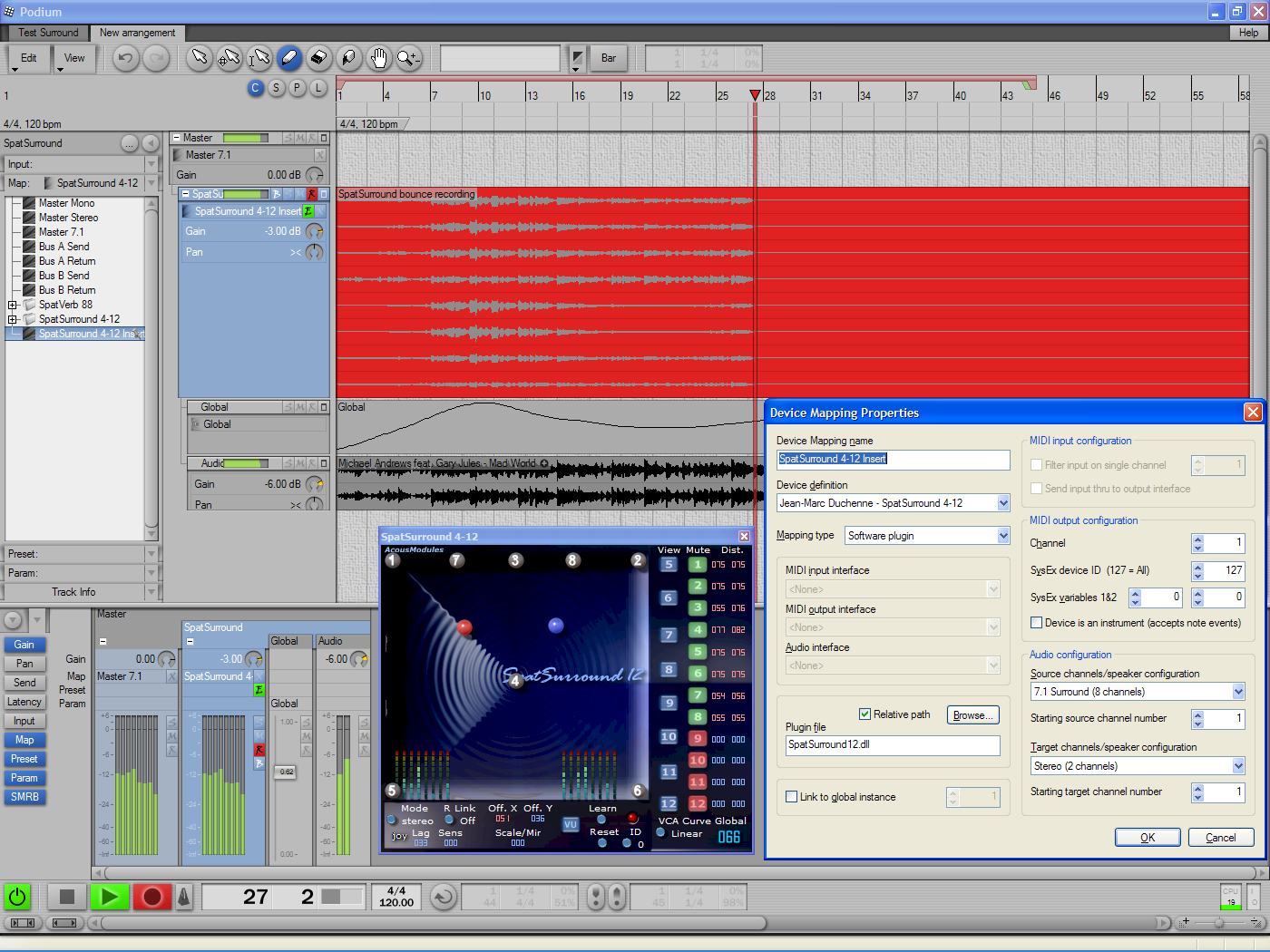
For reference, here’s a screenshot of my surround test arrangement:
http://www.zynewave.com/images/ScreenSpatSurround.pngAs you can see, I’ve created an insert mapping for your SpatSurround412 plugin. In the properties dialog, I’ve unchecked the ‘link to global instance’, since this mapping handles both input and output. Thus you can assign the insert mapping to multiple tracks, each having a unique instance of the plugin.
The explanation for the source/target descriptions can be found at the bottom of this page:
http://www.zynewave.com/guide/guide22_mappings.htmIn the arrangement I’m feeding a stereo track into the plugin and I have configured the plugin track for bounce recording. The screenshot shows bounce recording in progress. So you don’t need to set up busses to record the output of your multichannel plugins.
Oh, is there a diagram or a shema that shows the logic and the relationships between the tracks, mappings and busses routing ?
Sorry, no. At present I can only offer screenshots such as the one I linked above.
Frits
October 22, 2004 at 10:10 in reply to: Restricted to Podium license ownersZynewaveKeymasterThis content is restricted to Podium license owners.October 22, 2004 at 09:59 in reply to: Restricted to Podium license ownersZynewaveKeymasterThis content is restricted to Podium license owners.October 22, 2004 at 07:42 in reply to: Restricted to Podium license ownersZynewaveKeymasterThis content is restricted to Podium license owners.ZynewaveKeymasterWhat is specially needed to manage 2 monitors on your computer(except 2 monitors of course)
You’ll need a graphics card that has two monitor connectors. Either VGA or DVI connectors. If you’re using a laptop, then for most models you’ll be able to connect a monitor and use that as a dual screen. Once connected, Windows will handle the desktop arrangement on the dual screens.
ZynewaveKeymasterYou can sort of do that already. Open a second Project Browser window and place it on your second monitor. You’ll need to navigate into the arrangement on both windows. For the dedicated mixer window you could then choose to design your own mixer profile using e.g. two mixer regions and removing the tracks region.