
Zynewave's Forum Page
Forum Replies Created
-
 ZynewaveKeymaster
@thcilnnahoj wrote:
Here’s my 2 Eurocents:
1. You asked for it! Just a simple mockup for a kind of reverse group track with a thinner group bar, a little like a shadow of the receiving tracks. It’s not unlike Frits’ “ghost play” idea. (With and without “input arrows” – arrows coming from below looks even worse! :lol:)

The biggest downside to this is that there’re as many limits to these specific kind of group/ghost tracks as there are newfound freedoms. Just for example, you can’t have a few tracks from your drum group routed to the same ghost track as tracks from your guitar and synthesizer groups.
2. The other idea I had is this: Like group or composite tracks, you could configure a track to function as a “relay track.” After you set it as such, this track doesn’t feed its output into the normal signal chain anymore, but instead is available as a source or input mapping to other tracks. This mapping remains only as long as the track acts as a relay track, and is removed when the track is deleted or reconfigured. Filtering MIDI notes would probably need two of these in sequence: one to generate, one to filter and a normal track to recieve – assuming you can’t put a MIDI plugin before a track’s input any other way.
With this you can route tracks freely from one end to another – just without cables. And that’s the downside, of course… There’s no visual indication of what flows where. Simply because of this, I think it’s just not a good idea to mix and match real modularity with a linear visual/signal flow like we have in Podium. Bar something like the zGrid, or the routing window in Reaper, which are totally separate from the ‘normal’ view of the tracks. This is after all probably the best way. But really… press TAB and get to see lots of cables dangling? Ohh no, thank you! 😛
For those of us who’ve never used Tracktion, would somebody mind explaining a bit about those racks?
Thanks for the effort. I appreciate it. Maybe it’s just me, but I think offering this kind of functionality will scare many users away. I know I’m scared 😯
ZynewaveKeymasterHi Tony,
If you have problems with English, you can use the Google translate service:
http://translate.google.dk/?hl=en&tab=wT#hu|en|
If you write in Hungarian and use this service, the translated text may be more understandable than if you try to write English yourself. I’ve used Google Translate successfully in the past when I needed to email with users that have problems with English.
ZynewaveKeymasterThanks for the suggestions. I’m about to get beta2 ready, but meanwhile here’s a screenshot:
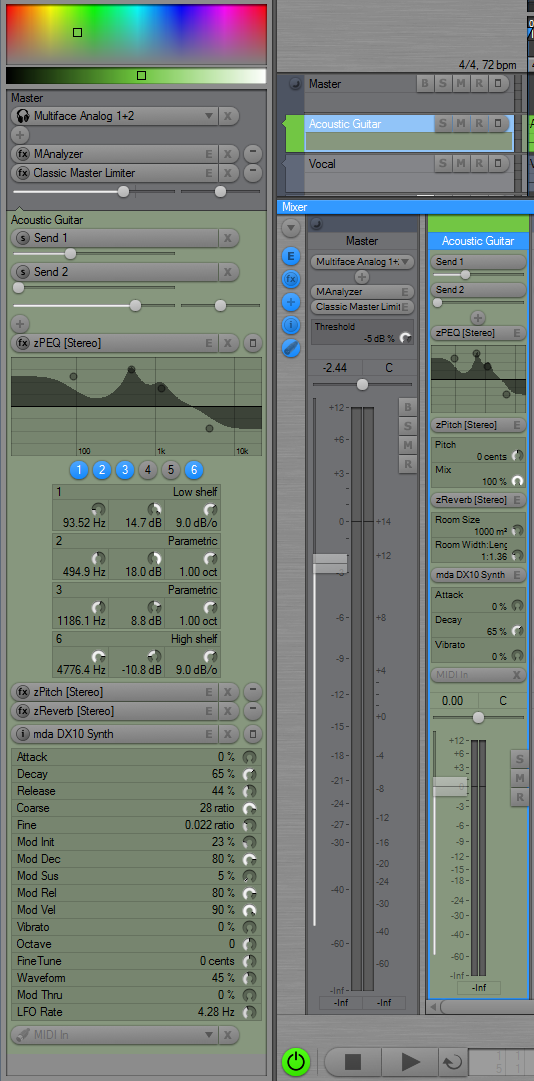
Notice the embedded editors in the mixer :D/
The rack editors can also show user selectable parameters. More info about this is coming in the beta2 release note.
Post if you have suggestions for more UI refinement.
ZynewaveKeymasterOk, I misunderstood the suggestion of a reverse signal flow.
I can see the logic in your parallel routing (in addition to the current serial routing), but I can’t see a simple way to incorporate this in the current hierarchic track display. It would be helpful if someone can produce a screenshot mock-up of how this should be laid out in the inspector, tracks region and mixer.
ZynewaveKeymasterWe’re on the same page here Mike. What you describe is exactly what I have been coding on since the 2.23 release. The 2.24 release will feature embedded plugin editors in the rack, instead of in the track panel. I expect to have a beta ready shortly.
ZynewaveKeymaster@Podianer wrote:
Hi Frits,
Long time no see.. I hope you are doing well! As Sam I was absent from the forum for a while. Today I took a look at the new version of Podium and I must admit, you really really nailed it this time. The ui changes are beautiful! New releases are always interesting to look at, but gui changes are the most fun part to discover and explore.. 🙂 Podium really looks polished now.. This inspires me and now I want to record something in Podium… Again: Thank you Frits!!
*off-grabbing-my-guitar* 8)
Hi Podianer,
Thanks, and good to hear from you again. I hope you stick around. There are still more UI improvements to come. 8)
ZynewaveKeymaster@eclairon wrote:
Once you have defined that parameter object, it will allow you to automate the parameter on a curve track, without worrying about the SysEx message format.
I am not sure what you mean with the above quote so I will now go peruse the wiki 🙂
Take a look at this chapter:
http://www.zynewave.com/wiki/doku.php?id=guide:parameters#system_exclusive_messagesIf you have defined parameter objects for the SysEx part volume messages, then these SysEx messages are handled like any normal MIDI control change message. This means that when you record the SysEx messages, they are not recorded as stream events, but as curve suquences or parameter events with a value dial on them, depending on how you have set the “record as curve sequence…” option in the parameter properties. Then it’s just a matter of editing the curve or adjusting the parameter event dials to set your part levels. Podium will do the SysEx formatting during playback. You will need to do a bit of work to set up the parameter objects, but once done, it will make everything else easier.
If the configuration of parameter objects seem too complex for your needs, then I can be persuaded to implement simple editing of short SysEx stream events.
By the way, I could send a midi file if it would help to highlight what I am trying to achieve.
Please do.
ZynewaveKeymaster@MelodyMan wrote:
I have another question. Is there a way to copy a track with just the effect rack and not the audio-events on it?
Another method that does not involve track templates:
Select the track you want to copy. Select “Track/Clipboard/Copy Track” (Ctrl+C). Select the destination track. Select “Track/Clipboard/Replace Effect Chain” (Ctrl+Shift+V).
ZynewaveKeymasterYou should take a look at the “composite” track option. It’s designed for multi-take recording. Mike G wrote a section in the guide about it:
http://www.zynewave.com/wiki/doku.php?id=guide:recording#loop-recording_and_composite_tracks
ZynewaveKeymasterHi Ron,
When you record or import SysEx data from midi files, these SysEx messages are stored on the timeline in stream events. As you have discovered, there are currently no way you can edit the contents of the SysEx messages. What the other users are suggesting relate to parameter objects, which can be configured to encode value changes within SysEx messages.
Can you describe what kind of SysEx messages you are trying to edit? If it is a short message for editing a parameter in your synth, then it may be worthwhile to create a SysEx parameter object. Once you have defined that parameter object, it will allow you to automate the parameter on a curve track, without worrying about the SysEx message format.
Frits
ZynewaveKeymasterSorry for not participating in this thread sooner. I have a hard time imagining how this would work. If it is to be a true reversal of the signal flow, then I see lots of conflicts. I guess there should be a group track option called perhaps “reverse signal flow” or “route output to child tracks”. What happens with the audio when it reaches the bottom of the hierarchy? Does it hyperspace up to the group track above the reversed flow track to continue its way up to the master? And what if you have a group track further up the chain which is also reversed?
A simpler solution would be to have a group track option like “ghost play on child tracks”. This will not do any reversal of the flow, but instead automatically replicate the events placed on the group track on all the lanes of the child tracks. The events on the group track would then be muted of course. The events on the group track would be drawn semi-transparently on the child tracks.
December 5, 2009 at 04:00 in reply to: Halion player crashes podium when I don’t connect eLicencer #16915ZynewaveKeymaster@Mike G wrote:
-Either an option for bounced tracks to unload their plugins.
If I understand you correctly, you just need to activate the “unload plugins when bounce” option in the bounce submenu. If your halion player tracks are bounced, then the plugin should never be loaded until you unbounce.
ZynewaveKeymaster@thcilnnahoj wrote:
Just a tiny nitpick: The left side of the selection frame is overlapped by the line separating the “group level strips.” This can, with some color combinations, lead to an optical illusion that it is only 1 pixel wide on this side instead of two.
That’s not a line, that’s a drop shadow from the elevated vertical group bar 😛
About the automation recording issue: It really only works now if there’s no input assigned. Why did you decide against it working with bypassed inputs, like you suggested at first?
I was unsure of the consequences, and so close to a release, I settled for the unassigned input. I may extend this to include bypassed inputs in a future release.
ZynewaveKeymaster- New track chain panel for managing effects, instruments, busses and inputs.
- Extensive redesign of the track inspector, tracks region and mixer.