
Zynewave's Forum Page
Forum Replies Created
-
 ZynewaveKeymaster
@UncleAge wrote:
Once again I may be reading you wrong here but… Are you saying that, by design, we won’t be able to bounce the bottom track?
You will be able to bounce the output of the bottom track, but the bounce track need to be above it in the chain. That’s how the old “insert bounce track” command worked. You should not configure the bottom track to be both the bounce track and the instrument track, because the bounce sound events and the note sequence events would then overlap on the same track lane.
ZynewaveKeymaster@UncleAge wrote:
After downloading 2.06 beta1, I only found three issues…
Thanks for testing.
**Offline Bounce**
In the bounce sub-menu it lists the name of the track and the effect tracks as the available choices. Except the track name is grayed-out and is not an available option. Which means in this case I can’t record TruePianos (at least not yet).If I go into the track properties and enable the bounce feature, I can then go back to the track and bounce the main VST, TruePianos. At this point, in the bounce sub-menu, the track name is grayed out still but this time it has a check mark.
At this point if I choose one of the effect tracks for bouncing and then return to the sub-menu again to try and check mark the track name again:
1. The option is still grayed and won’t allow me to choose it as an option.
2. The option for bouncing audio is un-checked in the track properties as well.The track is grayed out because it should not be possible to bounce enable the bottom track in the chain. This is because the bounce sound events otherwise would overlap any other sound or note sequence events that is on the track. I’m going to change the track properties dialog so that the bounce options are disabled for the bottom track. I decided to include the grayed out track name in the menu, to keep the same chain structure as is shown in the Fader and Meter menus.
Note that if all tracks are grayed out in the bounce menu, enabling one of the options in the bounce mode submenu will insert a blank “Bounce” effect track above the bottom track.
In addition I would like to ask if it is proper to have the options split out into different menus (track properties vs bounce-sub menu). I know this may have been overlooked but I thought this would be a good time to bring it up.
I don’t have a problem with this. The same would apply to the Fader and Meter submenus. At least they are all located close to each other.
Will “Realtime Bounce” keep the tail end of the audio? I’m not familiar with “Realtime Bounce” and was only using “Offline Bounce” in the above example. Either way the bounce rendered fine except it was the same length of the midi clip which means there wasn’t a trailing reverb at the end. Will “RealTime Bounce” correct this situation?
Realtime bounce will not behave different to rendering in this respect. What I think will be my official recommendation is to put an “End” marker at the point where you would like the song fadeout to stop. The bounce sound events will resize to the position of the marker.
Let’s say I bounce at the EQ track. Then I change the sub-menu option to the reverb track because I want a rendered bounce at that stage in the tree. As soon as I change the option in the sub-menu the bounced audio in the EQ track is automatically transferred to the reverb track. No harm done really as I can move it or bouncerecord over the top of it. But I’m wondering why it wouldn’t just stay put and let me add another ender at a different stage in the chain.
Managing multiple simultaneous bounce tracks in an effect chain would complicate the bounce submenu I think. In these rare situations you will need to do a bit of manual work with the bounce options in the track properties dialog.
ZynewaveKeymaster2.06 beta1 is available in the VIP lounge.
Changelog so far:
• The bounce waveform on hidden bounce tracks will be drawn on top of the events on the track lane.
• Bounce sounds on hidden bounce track lanes will automatically resize to fit the entire length of the arrangement.
• The “B” bounce button is shown on the track headers and mixer strips, if there is any bounce enabled track in the effect chain.
• The old “insert bounce track” menu command has been replaced with a “Bounce” submenu. All effect tracks in the chain are listed in the menu, making it possible to select at which point in the chain the bounce should be executed.
• The Bounce track submenu has a “Bounce Mode” submenu with options for selecting offline rendering or realtime recording mode.
• Tracks set to realtime recording bounce mode now have a dedicated “activate realtime record” option in the Bounce submenu. This replaces the previous realtime record method of activating both the bounce and record button. The bounce button is painted red when recording mode is activated.
• Added “hide bounce track lane” and “unload plugins when activated” options to the “Bounce” submenu.
• Changed the key shortcuts for switching bounce playback and rendering. Pressing the “B” button or the B shortcut key will now perform a render, effectively acting as a freeze button. Holding Ctrl while pressing B will switch playback of previously rendered audio.
• Starting a bounce render will automatically create a new sound event on the bounce track if the previous event has been deleted or moved to another track.
• Extended the “control type” combobox in tracks region properties with a choice for hiding all controls on the headers.
• The controls on the track panel in the inspector will use the control style selected in the inspector view menu.
Note that the new bounce mode options are not yet saved in the project file.
ZynewaveKeymasterYou can use the copy/paste menus in the object list. Load the project where you have made the drumkit presets. Open a List Window (Ctrl+L) and locate the drum kit preset objects in the device definition folder. Select all the objects you want to reuse and use the Copy command to copy these objects to the clipboard. Now load your new project, locate the proper device definition, and use the Paste command to insert the drumkit presets.
ZynewaveKeymaster@bladerunner wrote:
i have tried this with the ‘open new browser window option’ but its not as ideal as i had hoped. you can pull the mixer up as far as it will go but you still see lots of other elements within the same window(scrollbars and the timeline etc.).
You are on the right path. The Podium default setup includes an “Arrangement – Split Mixer” profile. Select this profile from the view menu in the second browser window. You can then customize this profile as you like.
ZynewaveKeymaster@ronin wrote:
It’s not very important what I have to say but If you (frits) are really going to implement the “track wide mute” please consider that some plugins produce noise or constant signals. I guess the lane track is the track where the midi/audio stuff resides? In this case a noisy guitar amp would still be audible if the bottom track is muted.
As part of the change, muting the bottom track will automatically mute all chained effect tracks.
ZynewaveKeymaster@Conquistador wrote:
@druid wrote:
I agree there should be seperate quantize settings.
And I would do it per … track. I think. Though part of me does think that’s a little more busy than required, in which case I would have it for the arrangement.
I would say per track as well.
I might want separate quantize settings for different drum parts for instance. I think I would have very little need for a global setting. Offering both options is probably the best way forward.
As I understand input quantization, it is quantization applied to MIDI input before it is recorded into a sequence. Aren’t you talking about automatic quantization applied to playback of already recorded sequences?
ZynewaveKeymasterIf you select the first blank effect track below the “send 2” you can see in the track inspector that this track is muted. Unmute this track, and then the lane track should be unmuted as well. The effect track could accidentally have become muted if you had selected it and then pressed the M key.
This is actually something I’ve been meaning to change in one of the next updates. The possibility to mute any track in the hierarchy dates back before the compact track layout mode was implemented. I’m going to change it so that it is only the lane track at the bottom of the chain that can be soloed and muted. This should avoid these types of confusions.
ZynewaveKeymaster@LiquidProj3ct wrote:
@Zynewave wrote:
You are still able to edit the events on the lane when the bounced waveform is drawn on top
That means that you can move and delete bounced clip without unbounce the track, doesn’t it?
Yes, but you will need to unbounce the track or redo the render to hear your changes.
ZynewaveKeymasterI tried making the bounce options clearer by introducting a “Bounce Mode” submenu:
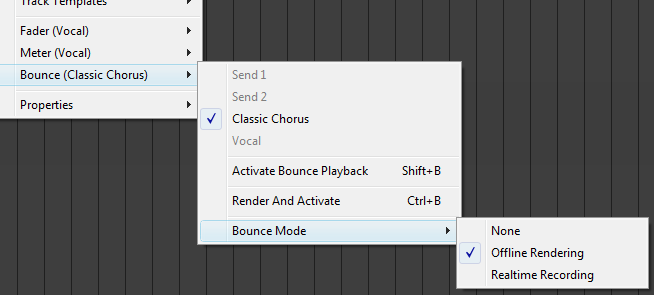
If the “Realtime Recording” mode is selected, the “Render And Activate” menu is replaced by a “Activate Bounce Record” option.
Pressing B without Shift or Ctrl will alternate between rendering and deactivating, just like a freeze button.
Any suggestions on how to simplify this even further?
ZynewaveKeymaster@UncleAge wrote:
When I press the “B” button I want it to “Bounce/Freeze”. Once the bouce was created the track and button would stay in that state. Clicking the button again would unload the bounce. I guess I fail to see the need for both the record and playback options. In my mind I see the track going into a “Bounce Playback” state automatically after I record/create the bounce.
That is precisely how I plan to implement it. The B button will then act precisely like the freeze button in other hosts. What you misunderstood is that the purpose of the “Activate Bounce Record” is to enable realtime-bounce recording, as opposed to rendering the bounced audio offline. You can ignore this option if you don’t have the need to bounce realtime for such things as external hardware, DSP hardware plugins and native plugins not capable of working faster than realtime. Perhaps this option will be more obvious if I renamed it to “Activate Realtime Bounce Record”?
ZynewaveKeymasterThe “Activate Bounce Playback” menu reflects the on/off state of the B button. The “Activate Bounce Record” is a new option I’ve added, to replace the old realtime bounce record mode which was set by enabling both the B and R buttons. This has never been an obvious combination, so I think it is better to introduce a new dedicated bounce record track option. Only one of the two activate bounce menu options can be enabled at a time, so the B button can be either off/green/red (or whatever the color is set to be in the colors dialog).
ZynewaveKeymaster@UncleAge wrote:
Let’s say I have set the track for “Bounce Playback” allowing the VSTi to unload and lighten the load on the cpu. And then a little later I decide that I want to keep this bounced audio “as-is”. Would I need to go back and “Bounce Render” or would I be able to copy the bounced audio (currently in a Bounced Playback state) out to another track?
You can unhide the track lane for the effect track that is set as the bounce track. That will reveal the bounce event, which you then can drag to another track.
ZynewaveKeymasterWhen you record-enable a track, Podium will record any output from the plugin assigned on the track. That includes both MIDI note outputs, as well as parameter automation done by dragging knobs in the editor. Discovery apparently outputs the same MIDI notes that it receives from Podium. There must be an option somewhere in Discovery that can disable this behaviour.
ZynewaveKeymaster@LiquidProj3ct wrote:
Now it works fine, but it shows a weird warning sign. Should I ignore it? or have I to do something?
If you place the mouse over the error button, an error message should pop up. Let me know what it says. You could also email me your project file.