
Zynewave's Forum Page
Forum Replies Created
-
 ZynewaveKeymaster
@swindus wrote:
a. When using the command ‘Hide Tracks in Group’ on a bounce track the plugin mapping and the fader of a child track is shown on the bounce track header.
I’ll look at that tomorrow.
c. Moving the first effect track in a track header with the submenu command ‘Move Track’ above the next effect track does not work, moving below works.
Fixed in the new beta 13.
One question: Is it possible to deactivate the automatic track header sizing when opening/closing the mixer? Would be great because all the optimized track header sizes are ‘lost’ after opening the mixer view.
Not currently. I’m planning to change how the track resizing works. With the new compact headers there are more information shown on the headers, and it may then be undesirable that the tracks resizes when the entire tracks region is resized.
The new beta 13 has further changes to the track menus, including submenus for presets and parameters.
ZynewaveKeymaster@Igr0 wrote:
I have strange bug with all 1.95 betas.It happens when i create new arrangement, which have 4 audio tracks and all things by default.So, i have 4 tracks. Then i delete last track(using delete bottom), then next track and so on.But when i delete last track podium crashes. Sorry for my english 😳
Thanks, it is fixed in the new beta 12.
Beta 12 furthermore has a new track menu. I’ve joined the right-click track menu and the left-click object popups into one menu. There are new submenus for: “Assign Input”, “Assign Output”, “Assign Effect”, “Assign Source” and “Insert Effect Track”, depending on which track you click on.
The “Assign Source” submenu includes all device mappings that produce sound, i.e. instruments and bus returns.
I’m going to extend this menu with “New Parameter Track” and “Assign Preset” submenus. This should then allow you to do everything on the track headers, without having to use the track inspector.
ZynewaveKeymasterSo if there were no fixes at all you would wait even longer to release 1.95?
Sounds like we are now moving to a longer development cycle for Podium releases (and of course fixes) in future if that is the case, which is fine if that approach works best for you. Is that a correct assumption?
I have already replied to this question some time ago in the topic you posted in the VIP lounge:
http://www.zynewave.com/forum/viewtopic.php?t=1475
The design of the new track layout mode is a major feature. When it is done I’m going back to more regular updates.
ZynewaveKeymasterBeta 11 is available. This includes the new track header style and an updated group panel that matches the new header style.
ZynewaveKeymasterOn another note, do you have any sort of time frame for a release of 1.95?
It has been more than 8 weeks and AFAICT there are some bug fixes that are in 1.95.
There are no important bug fixes coming in 1.95. Otherwise I wouldn’t wait this long with the release of 1.95.
The available 1.94 demo time expired yesterday, so I am trying to wrap up what I have made so far. Hopefully 1.95 is ready within a week. This means the compact mode unfortunately will not be as completed as I had hoped. I still have to do some work on the track menus.
ZynewaveKeymasterhow does the Mixer look now? Are you making these changes there as well or leaving it as is?
I’m not changing the mixer this time around.
ZynewaveKeymasterMore experiments. This one I would really like your opinion about. Previously the entire track lane headers have been colorized with the track color. With the recent addition of the chain panel to the headers, I think it is becoming too overwhelming with the colors. Depending on the colors selected for the track, it can be difficult to distinguish lit BSMRX buttons and text. I’ve tried a layout where only the right edge of the track lane is colored, and the main header area is using the normal face color. This also makes it easier to distinguish the currently selected track:
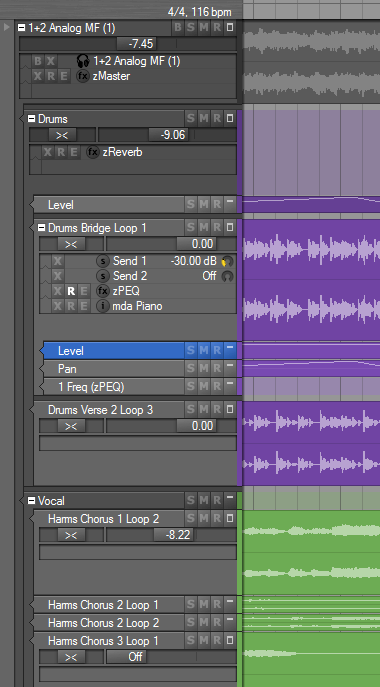
Furthermore you may notice that I have added a spacing between track groups, making a clearer division between groups and parameter tracks.
Anyone still prefer the old colorized track headers? Otherwise they are going out.
ZynewaveKeymasterI just mentioned this because it is the only thing left to add to the track header and the mixer and inspector can be hidden without missing them. For me it would be very useful but thats just me ….
Don’t worry. An “Assign input” submenu will be added to the lane header menu.
ZynewaveKeymasterWould you still consider making the sliders, at least the panning, adjustable by moving the mouse on the y-axis? (With the dials, both ways were fine.)
I think this will be counterintuitive with horizontal sliders. You can hold shift and drag to make fine adjustments to pan. You can also drag out the width of the track headers to increase the size of the sliders. Is the problem only the lack of precision when dragging the pan slider?
Will all corresponding dials in the GP, and especially the ones on parent tracks in the chain panel be eventually replaced with sliders? I figure they’d have to be pretty tiny again to fit.
So far I have no plans to replace the dials in the group panel and elsewhere in the track inspector.
ZynewaveKeymasterWith some configuration of the tracks you can make the new sliders work post-effect:
Disable the gain/pan controls on the lane track and enable the gain/pan controls on the topmost track in the effect chain. In the group panel the gain/pan controls should then appear at the top of the chain. The track sliders will control the first enabled gain/pan controls found upwards in the track chain.
Later on I may add a track menu command that can switch between pre/post faders without having to enter the track properties dialog.
Note that currently the track meters always display the output of the lane track, i.e. before being processed by the effect chain.
ZynewaveKeymasterSomething must be using the CPU. Open the Windows Task Manager and check the CPU usage when monitoring is off. One explanation can be that Podium does not disable the ASIO driver when monitoring is off, so the driver may be using some CPU. You can verify this by disabling the interfaces in the interfaces dialog.
ZynewaveKeymasterThanks for the comments. Beta 10 is available. I agree that it’s hard to read the small font, so I’ve tried using the normal font size with larger fader knobs. The downside of this is that the space available for the knob movement is smaller and hence accuracy is smaller. But I think it’s ok still. I also moved the faders to the top of the track header, and dropped the glass-look. I’m looking forward to comments on this new look.
ZynewaveKeymasterBeta9 is uploaded. The pan dial in the track header is replaced with a pan slider similar to the gain fader. Also changed the fader style. There are also small changes to the BSMR buttons. The minimized track header is now 1 pixel taller which results in a more precise display of the waveform in sound events.
ZynewaveKeymasterWhich browser? Double-clicking objects opens the properties dialog, except in the track inspector where double-clicking assigns the object to the track.
October 27, 2007 at 20:23 in reply to: Restricted to Podium license ownersZynewaveKeymasterThis content is restricted to Podium license owners.