
Zynewave's Forum Page
Forum Replies Created
-
 ZynewaveKeymaster
1. Can I also change a track type in Track Properties as per normal to a bounce track from within the track header?
Yes.
I say this because a new user looking at that amount of information duplicated in the GP and at track level (once a new arrangement is created) might simply be very confused. When I initially saw your latest screen shot I was totally puzzled by the need for an exact duplication of info (with a slight difference using a container) at track level.
As I already pointed out in an earlier post, if you have selected a track further down the track list, the master and the group lane headers may not be in view, and so the group panel can be used to always have the complete signal chain available.
2.I think even now in compact mode one can drag tracks vertically. Still Possible within track headers?
Not yet.
The trip wire here is that in Compact mode a user must access the GP to add an effect track but is that really necessary now with track headers Frits?
You can insert effect tracks using the context menus on the lane headers.
ZynewaveKeymaster1.If we now have this info in the track header containers / holders are they fully accessible tracks as in Expanded mode or the current Compact mode in Beta 3? Or only for viewing with the GP still needed in Compact mode for some things?
The chain panels on the lane headers have the same functionality as the group panel. Only thing not available are the menu buttons in the group panel.
ZynewaveKeymaster1.Where are the track meters? Are they not visible in Compact mode? (They are in Beta 3).
They are still available. I’ve just disabled them in my setup.
2. Each empty track has a Level, Send and Pan parameter independent of the FX mappings parameters AFAICT, if that track feeds into an Effect Track the now child track (if clicked on) will show the parameters for the Effect track above it (in the parameter panel) but…in your screen shot the Level and Pan parameter tracks are still visible how so? Especially if you are in Compact mode. Maybe I do not work that way and have missed a key Podium feature all this time…but please clarify thanks.
The level and pan tracks in my screenshot control the output of the bottom drums bridge track. I’m going to reverse the order of the parameter tracks, so that they appear in the order of the tracks in the chain. Thus “1 Freq (zPEQ)” will appear above Level and Pan.
3. What mode is your screenshot in? Expanded or Compact?
Compact.
ZynewaveKeymasterBut I don’t understand why there is a space between the main Drums track and the level automation track below. It make it appear as if it is a part of the child group.
It seems visually more logical to have it just below, and the space between the Level and the Drum Bridge group ?It may appear as a spacing, but it’s determined by the height of the drums group track. You can drag the height of the track so that it fits the height the of the chain panel.
ZynewaveKeymasterP.S.: Why inspector contain( it just copied) the same info, as in tracks.Double vision?
You can hide the group panel in the inspector if you prefer. The screenshot shows the top tracks selected, which means the inspector shows the same info as the three lane headers. If you select a track further down the track list, the master and drums group lane headers may not be visible, and thus the inspector group panel can be useful to show the complete signal path up to the master.
ZynewaveKeymasterFirst attempt at embedding group panels (or rather track chain panels) in the track lane headers:
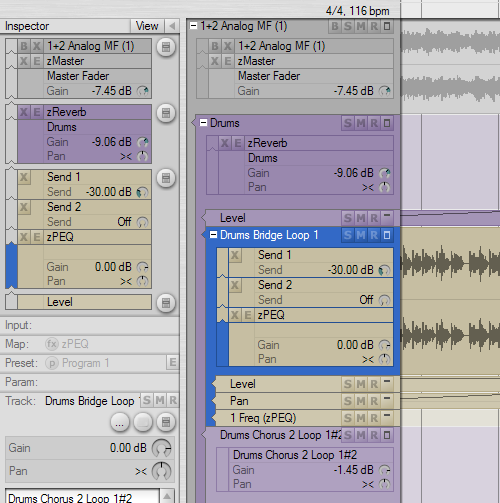
Any comments are appreciated, even if it’s just Yay or Nay. I’m curious whether people think this is a good development.
ZynewaveKeymasterI did not however specifically ask for the GP to be used to tackle the biggest single problem Podium has had…
Showing more than one FX on a track.
Showing multiple FX on a single track is what the compact mode eventually will offer. I’ve hinted several times in this topic that I plan to add a miniature group panel to each track lane header. Imagine the block of a track chain in the group panel embedded on each track lane header. Even though it’s still multiple chained tracks internally, the UI will present it as a single track. This is also going to solve the other issues you mentioned with the track focus going away when you select a hidden FX track.
In this screenshot the Overtone track lane is hidden, how do I in compact mode add parameters to the Overtone track that is visible in the GP?
Select the overtone track in the group panel and use the param panel. As mentioned above, when I’ve implement the embedded group panel on the track lane headers, you will not have to use the track inspector for this.
ZynewaveKeymasterBeta3 is uploaded, with the fixes discussed in previous posts, as well as:
• Added “Set default track height” command to the track header context menu. The arrangement stores a default height for both normal tracks and for parameter tracks. The command sets the default height for new tracks, but also applies the height to all tracks already in the arrangement.
Note that these default track heights are not yet saved in the project file.
ZynewaveKeymasterYou could have parameters for 3 – 5 plugs in one chain all sitting below the first plug in the chains track. It is far more intuitive and easier IMO to see parameter tracks under their own track. I am not sure there is any need to change this. Why change it at all?
The main goal of the compact mode, is to hide effect tracks and embed them into the track lane header of the bottom track in the chain (yet to come). This means parameter tracks for the effect tracks needs to be placed at the bottom of the track chain, because their parent effect tracks are not visible. All this results in a track layout similar to what you see in other hosts, which many users may be confident with. You yourself has pushed for a way to get rid of the many nested effect tracks. The compact layout mode is a solution to this.
I think it would be a good idea to have a tutorial done to explain what the gaps are for in the GP, in a bit more detail . I imagine a short Wiki article would do. My understanding is that they are there to provide a visual indication as to what tracks flow to where but also what tracks are on the same level or not. (Correct me if I am wrong) It’s such a radical approach but once you get it, it’s seriously clever and easy to follow. Unique.
The gap between two tracks in the group panel appears whenever there are more than one child track under the parent track. Hence the menu button to the right appears at the start of each gap, to allow selecting a different “branch” in the hierarchy.
I like this idea but…in Compact mode *any* parameter tracks are deleted. So if you have a chorus FX processing a Compressor track the parameters for the compressor and the Chorus will disappear. This is another reason why having parameter tracks visible under their parent FX track (in Modular and Compact modes) is a far better idea IMO. A bug?
*any* parameter tracks belonging to the deleted track. So if you delete the chorus FX track, only the chorus parameter tracks are deleted.
ZynewaveKeymaster@swindus wrote:
@Zynewave wrote:
@swindus wrote:
After changing this bit of a track to true the group panel doesn’t shows the new state of the track. Only after clicking a button like ‘X’ or using the Ctrl + PageUp/PageDown shortcut the group panels updates to the new state.
I can’t reproduce this. Can you provide more details? What do you mean with the “new state”?
I meant the graphical representation of the tracks in the group panel. Or in other words: the group panel update()/invalidate() function is not triggered.
Fixed. Thanks.
ZynewaveKeymaster@acousmod wrote:
I understand, but in this case moving a track results precisely in messing up the hierarchy. It will be perhaps a little disturbing for beginners (like for me !) to see that a same action (moving a track) results in different results depending on if you drag up or down.
If the dragged track should be kept at the same group level, it would not be possible to drag a track into a group. That’s why I made it so that dropping single tracks under a group track will move it into the group. Note that it is not a matter of whether you’re dragging a track upwards or downwards. It’s whether the dragged track is a single track or a group track, and if you are dropping it below a group track.
Also, do you intend to restore the Group Hierarchy Level option in the Track Properties ? It has disapeared too in the Expanded Mode.
It was usefull to be able to choose it when we created a new track with a double-click.I removed the group level setting from the properties dialog, because this setting is now managed by Podium in the compact layout. I don’t plan to bring it back. So in expanded mode you need to use the increase/decrease group level commands.
ZynewaveKeymaster@swindus wrote:
After changing this bit of a track to true the group panel doesn’t shows the new state of the track. Only after clicking a button like ‘X’ or using the Ctrl + PageUp/PageDown shortcut the group panels updates to the new state.
I can’t reproduce this. Can you provide more details? What do you mean with the “new state”?
ZynewaveKeymaster@swindus wrote:
@swindus wrote:
I also manged it to create an empty track without any mapping on the top of the track structure by using the “use as group track” bit on several tracks in a strip but don’t know how to reproduce it yet.

This happens after making a param track to a group track, in this example the filter_cutoff track.
The bottom empty box you highlighted appears when there are no child tracks in a group track. The empty box is shown to make room for the menu button to the right, which you use to create a new child track in the empty group. An unrelated problem your post highlights, is that it should not be possible to convert a param track into a group track. I’ve solved this now by implementing a “Parameter Track Properties” dialog, which only has a few relevant settings from the normal track dialog.
ZynewaveKeymasterPerhaps that if I move it with a modifier key I can force it to be a child of a group ? Otherwise the hierarchical order is conserved ?
Thanks for the screenshots. It confirms to me that your drag actions behaves as I intended it to. I want the “compact” mode to be as simple as possible, and one important simplification was to remove the horizontal placement when dragging tracks. This ensures that you don’t accidentally mess up the hierarchy. So I’m not fond of adding a modifier key to allow placement of a dragged track on a different hierarchy level. As you described in your third screenshot, you can achieve what you want by dragging the group track instead of the single track. You can also use the “move track” submenus in the track inspector.
ZynewaveKeymaster@Conquistador wrote:
Hmmmm
Frits if I open a project that was created in a previous version of Podium and then change the mode to compact mode from the arrangement properties option, the visual look and feel of the GP and Track view does not change is that correct?
The group panel looks the same whether using compact or modular mode. If you have effect tracks with hidden lanes (shown as group bars to the left of the source track in modular mode), these should disappear in compact mode.