
Zynewave's Forum Page
Forum Replies Created
-
 ZynewaveKeymaster
This is a bug that I have fixed for the coming 1.95 release.
ZynewaveKeymasterIf you’ve enabled the “link edit cursor to play cursor” option, the play cursor will stay at the play position when you stop playback.
ZynewaveKeymasterCurrently they are fixed at 0 dBFS.
Should this be an option in the arrangement properties, or is there a need to customize this for each track meter?
I’ve been meaning to look into the K-System, which seems to have become a standard:
http://www.digido.com/bob-katz/level-practices-part-2-includes-the-k-system.html
What’s your opinion on the K-System?
ZynewaveKeymasterI never got a reply. I’ve just tried resubmitting the report using a different contact form on ikmultimedia.com. I’ll post again as soon as I get a reply.
ZynewaveKeymasterWhen the track redesign is completed, I will return to extending the Mackie support (all the assignment buttons are still unused). After I feel the Mackie support is complete, I’ll be open to suggestions for other controllers. Have you purchased a controller yet?
ZynewaveKeymasterPodium doesn’t like being run from a debugger, which is a nuisance! I understand why it’s the case
I haven’t put in any code that should block debugging. What is the problem/case?
ZynewaveKeymasterAre you running a 30 inch screen or something?
It’s a Dell 2007FP (20.1″). I bought it mainly for my development needs. They are getting pretty cheap recently. Especially 1680×1050 widescreen seems to take over as the most popular resolution, judging by the range of new display models that are put on the market.
ZynewaveKeymaster1280 x1024
And yours?
1600×1200, but I think the majority of users have 1280×1024 resolution displays.
ZynewaveKeymasterWhat about the GP slider?
I don’t think adding a slider to the group panel is the optimal solution. If you have so little screen space that you need a slider to scroll the group panel, then hiding the group panel seems a better solution to me. You could set up two arrangement editor profiles, one with the group panel hidden, and then switch between the two profiles using the F8/Shift+F8 shortcuts. You could then also arrange the mixer as you like in one of the profiles.
I’m curious: What screen resolution are you using?
ZynewaveKeymasterIIRC you said in compact mode one will not be able to drag re order tracks.
” The new compact mode offers an option to reduce this space. What you loose is e.g. the ability to freely drag effect tracks horizontally to a specific group level. You’ll need to use the group panel for these kinds of edit actions.”
You can still reorder tracks by dragging vertically. What I wrote was that dragging HORIZONTALLY will not set the group level.
September 9, 2007 at 23:23 in reply to: Restricted to Podium license ownersZynewaveKeymasterThis content is restricted to Podium license owners.ZynewaveKeymasterLevel meter:
The “Level” parameter from the “Drums” track does not show up in the GP in your first screen shot…why? It is not hidden in the arranger so why is it hidden in the GP?Because it is not part of the branch that is shown in the group panel. I first selected the level track under “Drums Bridge Loop” to make that branch appear in the group panel, and then selected the master track. This is how the group panel has always worked.
zMaster on the Master out:
Ready or work in progress?It’s a fake, just for illustration.
I do think some of the GP changes are a step forward, however Frits I really do think that simply giving us the ZGrid would have saved you a huge amount of development time.
Going into details about this would be too exhaustive, but rest assured that these changes to the track layout provides a better solution than zGrid, on all accounts. Some examples: My screenshot shows only one plugin in each of the three chains. So placing a zGrid plugin in each chain would not result in fewer tracks. Instead using a zGrid instance would add an additional layer of plugin assignment. First you assign the zGrid instance to the track, and then you assign the desired plugins in the zGrid editor. The concept of a chainer IMO only has benefits for complex serial/parallel routings of multiple plugins. Simple serial chains of plugins are much easier managed with the channel strip templates I mentioned in my previous post.
Another major drawback with the zGrid/chainer approach concerns automation. Since zGrid would be a VST plugin, it is not possible to dynamically expose the VST parameters of each configured plugin within zGrid to Podium. To automate plugins within a zGrid instance you would need to use the zGrid editor to assign the desired VST fx parameters to a set of generic parameters that zGrid supports. These generic parameters can then be automated in Podium, but the parameter objects would then not have the actual VST parameter names.
ZynewaveKeymasterCommand types:
What will be the commands in these menu buttons…exactly, if I may ask?
What kind of “commands to move tracks and replace an entire chain of effects”?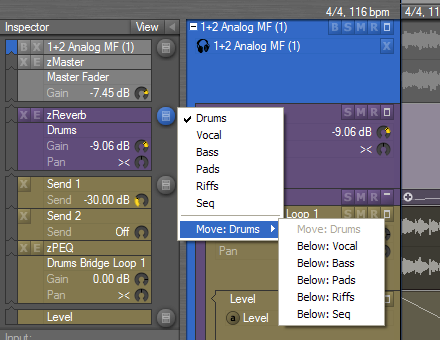
This menu shows all groups that are on the same level as “Drums”. Selecting a group will move focus to that group. This is similar to the old popup menu that temporarily was removed in the 1.94 release, due to the inspector redesign. The bottom submenu is a quick way to reorganize the groups, as an alternative to collapsing and dragging the group tracks. Clicking the menu button for the “Drums bridge…” chain below will show a similar menu for the tracks within the drums group.
This menu will be extended (probably in a later release) with submenus for recalling template tracks. It will be similar to the existing template track submenus, but will allow replacing the entire chain of sends/effects with alternative “channel strip” templates. Eventually I’ll add support for saving these templates to file, instead of storing them locally in the project.
ZynewaveKeymasterSo if one has parameter tracks for a Guitar Instrument track, various FX parameters (automated delay, another for a filter) all of these will appear below other tracks at the bottom?
No. They will appear immediately below the guitar track. Imagine if you created an automation track for the zPEQ in the screenshot. In the modular mode this will be shown as a child track of the zPEQ track, i.e. above the “drums bridge loop 1” audio track. In compact mode all automation tracks within the “chain” is displayed below the audio track. The automation track for the zPEQ would then be shown as e.g. “1 Freq (zPEQ)” with the controlled effect in parentheses. Acousmod recently posted a topic where he requested a possibility to have all effect automation tracks displayed below the source track, so that the source audio file is shown as backdrop in the curve editor.
ZynewaveKeymasterI think my last post answered most of your questions. If not, please ask again.