
 Zynewave
Got the file. I see that you have recorded the sustain as a series of parameter events. Try enabling the “record as curve sequence on separate track” option in the parameter properties dialog, delete the existing sustain parameter track and redo the recording. Let me know if you can get sustain to work this way.
ZynewaveEmail me your project file and I’ll check if your parameter setup is correct.
ZynewaveHi Mark,
if I want to keep multiple takes and then mix and match later, can I do that without just making tons of tracks?
I assume that you are referring to the fact that loop-recording creates a new track for each loop. There is no other way to make the multiple takes appear as one track. You can collapse the track group with the multiple takes if the problem is that the tracks take up too much space in the editor.
Frits
ZynewaveI see there is a “speedy deletion” notice on the page now, claiming that it is advertising. I better not get involved in editing the wiki. I would not want to get the reputation that Babya enjoys on kvr 😆
ZynewaveNice, did you create the entry?
I can confirm that the so far single line of information is correct. 😆
Zynewavethat is why I suggested to put the fader in the middle of the two level indicators… How about that?
Hmm, I think that will place the left and right channel meters too far apart. And what then with mono and surround meters?
ZynewaveIt seems you misunderstood me. To try to make it clearer, here’s a screenshot of a track configured both for level automation and audio mixing (which is a setup that I’m not recommending because it is of little practical use):
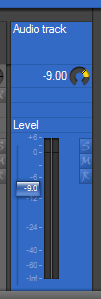
The fader requires more pixels than the width of the dB labels, even when the fader overlaps the labels. On top of that, one of my design criteria is that the level meters are centered on the strip, which results in some wasted space to the right of the meters.
ZynewaveZynewaveIn your screen shot the Map: and Track: panels do not appear to reflect the contents of the currently selected track / that has focus. Although it is difficult to tell for sure just by looking at the screenshot, it does appear that way. Please confirm or deny
The raised track with the drop shadow is the currently selected track. Clicking on any of the track boxes (except the dials) will select that track, and all panels in the inspector will update accordingly. Clicking on a parent track will not remove the child tracks shown in the group panel, until you select a track from a different branch of the hierarchy.
Zynewave@swindus wrote:
Another thought: Would it be possible to add the vst parameter to the track panel in the inspector (like the zEQ and zReverb does) for the used effects on the selected track? So there is no need to open the vst gui at all to change a parameter.
I’m not sure I understand you correctly, but: If you enable the “use generic editor instead of plugin editor” option in the plugin mapping properties, the track panel will show an embedded generic editor with all VST parameters.
ZynewaveI defintely want the faders next to the meters. As for the strips being to wide…I don’t understand why you said this.????
Try setting up a normal automation track with the mixer level parameter. Now “enable audio mixing” in the automation track properties. This will show you what I mean with wider. Btw. this possibility of assigning a track both for audio mixing and automation is not something I recommend. I may remove this feature at some point.
ZynewaveThanks for the reminder 🙂
I also deleted:
# Assignment of the same MIDI input to several tracks, to allow control of layered synths.
Zynewave@swindus wrote:
The first selected sequence in an arrangement or event in an editor can not be copied when I try to copy it with ctrl + left mouse button. This means a single selection (sequence or event) can not be copied at all with the mouse.
Ctrl+clicking will toggle-select the event. So what happens is that you unselect the event when trying to start a copy drag action. What you should do is press and hold the ctrl key after you have clicked the event.
ZynewaveDo I need to uninstall the old version or can I install over the old version?
Installing a newer version should automatically uninstall the old version.
Zynewavewould we be able to get an ‘open with external editor’ box for sound events?
I’ll think about it.