
Zynewave's Forum Page
Forum Replies Created
-
 ZynewaveKeymaster
- Minor improvements and bug fixes.
ZynewaveKeymasterI’ll think about the stereo to mono track option. If you want to hear the final output in mono (to test your song for mono compatibility), you can temporarily select the master mono mapping on the master track. This will mix stereo tracks to mono.
ZynewaveKeymasterI tried your project, and followed your instructions about moving the mouse fast over the waveform icons while it is playing, but I still can’t get it to crash. I tried it both on my W2K/800 MHz PC and my new dual core 2.8 GHz PC.
I assume you are using the latest Augur.dll, released in July?
What exactly is the message that is displayed when the crash occurs?
ZynewaveKeymasterIt seems if you accidentally record, with a track record-enabled it destructively over-writes it. Is there a reason this cannot be non-destructive?
The undo history is currently reset for the sounds and sequences that is recorded. An item on the future plan is to support undo of recorded material. If you happen to record over a sound, it is only stored in temporary files. The actual sound file is unaffected until you select to save the sound.
ZynewaveKeymasterI tried Augur, and I couldn’t get it to crash. I tried adjusting all parameters and even automated waveform selection. It’s possible that the crash is related to the Augur preset you are using. If you can email me a simple project with an Augur preset that causes the crash, I will have a look at it again.
ZynewaveKeymasterI think the best way to support this would be with a key shortcut customization dialog. There are just not enough keys to support shortcuts for all menus and buttons etc. Everyone has different preferences. I almost never use the scroll option, so I would prefer to use ctrl+F for something else.
October 10, 2005 at 17:05 in reply to: FR: Smart grouping/wraping tracks + multiple mapping idea #5552ZynewaveKeymasterOne item on the future plan is selection of multiple tracks. Once this is implemented, all track commands such as delete or grouping would be applied to all selected tracks. I think this is a better way to support more flexible track organization, rather than adding new commands for grouping multiple tracks.
One trick I normally use when I want to put several tracks into a group, is to collapse the parent group, increase the group level of the parent group (the entire group is affected), unfold the parent group, and decrease the group level of the parent (only the parent is affected). Thus you have added an extra unused level between the parent and all its children. Then you can easily insert a new group track between the previous parent and the sub tracks.
ZynewaveKeymasterYes, I stopped using the bold highlighting. It doesn’t mean I don’t work on anything currently 🙂
ZynewaveKeymasterThere is not much info about this in the guide yet. I have begun a rewrite of the ‘sequences’ section, which concerns the sound editor and also editing of audio events etc. on tracks.
Crossfade is not yet supported. I assume what you are looking for is a feature for crossfading overlapping audio events on tracks. This is on the plan.
multiple region edits, non-destructive recording
I’m not sure if you are referring to editing in the sound editor (destructive), or editing multiple tracks with audio events in an arrangement (non-destructive). Could you give a more detailed explanation of what you are looking for?
Frits
ZynewaveKeymasterThe audio parameter must be placed within a device definition object. The definition object should then be selected in the properties of your master output mapping object. If in doubt, check how the level parameter is created by the wizard ‘create audio output mappings’ command.
ZynewaveKeymasterI think a step in the right direction would be to show a warning popup on plugin tracks that does not have a preset assigned. I can’t think of a situation where you wouldn’t either have a program or a library preset assigned. I’ll try to fit this into the next release.
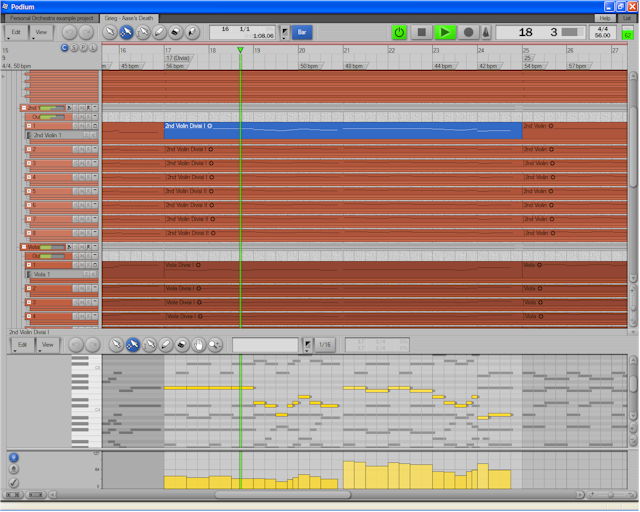
ZynewaveKeymasterI have updated the mp3 file. The previous mp3 was made using section samples. This version uses solo instruments combined into ensembles.
I have also uploaded the Podium project file, used for creating this mp3. The project has stickie notes explaining the techniques used. Find the download link below.
mp3: Edward Grieg – Aase’s Death
Podium project files: Example – Personal Orchestra
 ZynewaveKeymaster
Hello Max, and welcome to the forum.
Frits
ZynewaveKeymasterI’m a bit confused by your reference to firewire in relation to the ‘element’ as it’s a pci card. Have I missed something?
My mistake. I was referring to my experience with the Poco FW. The latency is also present on the PCI versions. Even so, you can get rid of the extra buffer latency by enabling ‘direct’ mode (i forget the name), which means that the host CPU usage will increase slightly because it will wait for the DSP card processing of the current buffer to finish.
ZynewaveKeymasterI have no experience with pricing of the different Powercore versions, so I don’t know if this is a good price. Unless you will need the three extra plugins, you should certainly be able to find the Element card at a cheaper price. Also consider that if you buy a PCI mkII, I believe some of these extra plugins are included in the base package.
I have only tried the Powercore FW with Podium, but the Element card should behave no differently. Be aware that all the plugins will introduce latency of an additional buffer, due to the fact that the audio must be queued for transmission over FireWire. Podium will compensate for the latency.