
Zynewave's Forum Page
Forum Replies Created
-
April 29, 2012 at 11:35 in reply to: Restricted to Podium license owners
 ZynewaveKeymasterThis content is restricted to Podium license owners.ZynewaveKeymaster
@levendis wrote:
@Zynewave wrote:
As far as I recall, the plugin database option has never been available when you are using a project template. Are you saying you used to have this option?
Yes… how strange?! I’d have to deinstall v.3.1.1 and reinstall a previous version to double check but am willing to take your word for it 😳
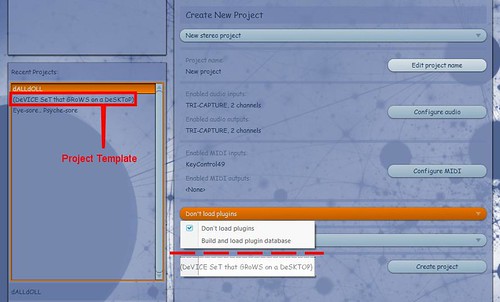 … this is the menu entry I thought was available.
p.s. My memory is not the most water-tight. I forget birthdays, what I went to the supermarket for and have a vivid (though false) recollection of travelling with Aeroflot.
Ok, this is a standard “new stereo project”. When you said template, I thought you were using one of your custom saved templates, in which case the combobox is not available.
When the “Load plugin database” option is not available in the menu, it means Podium has not found an existing plugin database. Try the “explore setup folder” in the setup menu, and check if you have the PluginDatabase.pod or PluginDatabase_x64.pod file.
ZynewaveKeymasterApril 28, 2012 at 23:03 in reply to: Restricted to Podium license ownersZynewaveKeymasterThis content is restricted to Podium license owners.April 28, 2012 at 22:48 in reply to: Restricted to Podium license ownersZynewaveKeymasterThis content is restricted to Podium license owners.April 28, 2012 at 22:44 in reply to: Restricted to Podium license ownersZynewaveKeymasterThis content is restricted to Podium license owners.April 28, 2012 at 21:44 in reply to: Restricted to Podium license ownersZynewaveKeymasterThis content is restricted to Podium license owners.ZynewaveKeymaster@levendis wrote:
Thanks for the improvements, Frits.
I even noticed the new object icons’ very tactile look 🙂Thanks. Which version are you upgrading from? It seems like it’s years since I last changed the object icons.
There is, however, a feature I miss. And that is the ‘Load Plugin Database‘ (from a template project) on the New Project Window. 🙁
As far as I recall, the plugin database option has never been available when you are using a project template. Are you saying you used to have this option?
ZynewaveKeymaster@kingtubby wrote:
Something changed in Podium 3.1.1 that disagrees with Elevayta freeq_boy and space_boy plugins and causes Podium to crash every time. To be fair they haven’t been updated since 2006, so current compatibility could be an issue though they did work in v3.1.0. It’s not a pressing problem as I’ve not tried to use them for quite a while – the problem arose when I did plugin database rebuild – I reinstalled v3.1.0 to check and they were ok, but I’ve removed them for now and was wondering if there’s an obvious change that might have caused the problem…
I haven’t tried these specific plugins, but I have found an issue that causes some older plugins to fail during plugin scan/load. I expect to release 3.1.2 tomorrow, with just this fix.
ZynewaveKeymaster@ups wrote:
Hi, i used the new version on Win7 32bit version with an Edirol UA-25. It did not work. the audiointerface doesnt work and podium shut down. 🙁
Is this a unicodething?If bugs have appeared in this version, they are most likely caused by the code changes I needed to make in order to support Unicode. Unicode support as such, should not affect audio interface and plugin behaviour.
Can you tell me more about this “Podium shut down”? When does it occur? Can you open the interface dialog and try to select another audio driver?
I need much more info, to be able to diagnose why/where the bug occurs.
I have already found one bug that causes older plugins to fail during plugin scanning, but it doesn’t sound like this is the bug you’ve encountered.
ZynewaveKeymaster@Infinitoar wrote:
My brain child, all of my hard work is “corrupt”. No matter how many times I click the .pod file it says it’s corrupted.
If you email me your corrupt project file, I can try to see what went wrong, and perhaps salvage it. If you suffered a crash or PC-shutdown during a project save command, then there should be a file with the extension “Temp001” in your project folder. This is the project file that is being saved, and it only replaces the real project file once the save is complete.
If you read this recent post by me, you’ll see that I do have plans to improve project backup:
http://www.zynewave.com/forum/viewtopic.php?p=21863&highlight=#21863
ZynewaveKeymaster@Guaranath wrote:
Greetings all!
Greetings.
I recently got an app for my iPad that is called TouchOSC, it is designed to be a MIDI controller for your desktop DAW (and obviously an OSC controller as well). You can edit and design your own templates to suit your needs or your DAW, so I was curious if anyone uses this app and has already designed a template for Podium? If not, I have read here that Podium uses the Mackie standard control setup – so theoretically I could design my own template assigning the Mackie standard designations?
That should be possible. I have no experience with the TouchOSC app, but I think it’s likely that some user already has created an MCU emulation. Perhaps these can be downloaded somehow.
ZynewaveKeymaster@druid wrote:
If you don’t mind me asking, Frits, was the reason you compressed the project files in the first place? Was it related to space utilisation, or were there other considerations?
Space/speed considerations. The .pod format was conceived many years ago, when this truly was an issue. For the updated project file format, I’m considering using http://www.sqlite.org . I have already made some experiments with it, but I haven’t yet determined if it will be efficient enough for real-time project storage.
ZynewaveKeymasterMake sure you haven’t selected the Axiom input on the “control surfaces” page in the interfaces dialog.
ZynewaveKeymasterHi,
The Podium mixer can only be controlled by Mackie Control Universal (MCU) compatible devices. I did a quick search on Pro 88, and it doesn’t seem like it can emulate MCU mode.
Frits