
Zynewave's Forum Page
Forum Replies Created
-
 ZynewaveKeymaster
How are your external devices connected to your soundcard? I’m asking because your “V-verb analog” mapping is configured to output on channel 1+2, which is the same channels that your master “Multichannel 1 PHASE X24 FW+2 PHASE X24 FW” is mapped to. That is why you are hearing the output to the V-verb mixed into your main mix output.
ZynewaveKeymasterAfter testing your file, I found that it had been corrupted, but I don’t know how this could have happened. In the middle of some parameters labeled “CV Seq 2-CV Seq 1-28” etc. the parameter name seemed to have been overwritten with the text “Metal”. Can you remember if you were editing an object or a preset in a plugin named “Metal”?
Anyway, I replaced the “Metal” text with the proper parameter name, and the project file can now be loaded. I’m emailing you the fixed project file back, but please check that everything is ok. I’ve also made a small change in Podium so that it now reports the file to be corrupt, instead of crashing.
Please let me know if it happens again, and if so send the corrupt file.
ZynewaveKeymasterPlease send the project file.
ZynewaveKeymasterCould be the initialization of your MIDI/audio drivers. Try deleting the Podium.ini file (remember to backup the file).
February 9, 2009 at 20:35 in reply to: Restricted to Podium license ownersZynewaveKeymasterThis content is restricted to Podium license owners.ZynewaveKeymasterZynewaveKeymaster@LiquidProj3ct wrote:
Can I do something for help you?
As I wrote in a previous post, I’ve contacted tone2 about a Gladiator2 NFR license. If/when I get a positive reply, I’ll continue my debugging.
ZynewaveKeymaster@pj geerlings wrote:
@Zynewave wrote:
there should be an “event list” profile in the piano roll editor view menu.
I read the section on the piano roll – no mention of the “editor view menu” – where is it?
At the top left in the editor toolbar:
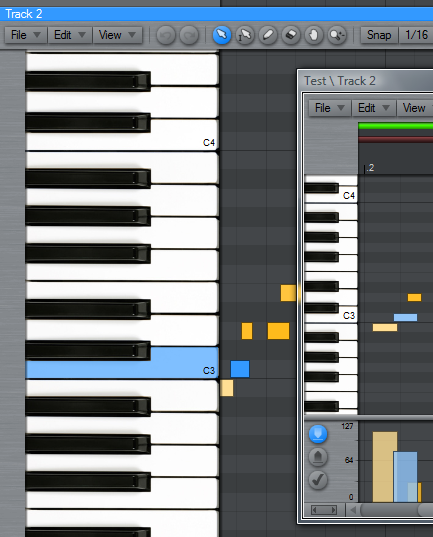
@Zynewave wrote:
Also remember the “select overlapping” command in the edit menu.
Er ah, Why? What does this do?
It selects any note events that overlaps other note events. You can use it to check if there are any overlapping, and then use delete to get rid of them.
ZynewaveKeymaster@LiquidProj3ct wrote:
Frits,
I just emailed you a pod file where Gladiator 2 responds to program changes. Try it!
Best regards
I’m afraid I can’t test it with the Gladiator2 demo.
ZynewaveKeymasterI just tested on my setup, and delay compensation of external hardware effects are working fine for me. I did not use Nebula3 in my master chain, but the SIR reverb, which adds ~200 ms latency.
Please send me your project file, so I can examine how you have set up your external reverb devices.
Have you verified that your soundcard mixer does not mix in the reverb return into the main mix?
ZynewaveKeymasterIf you haven’t modified the default setup, there should be an “event list” profile in the piano roll editor view menu. This event list does not have special editing features, so it is mostly usable for viewing existing events in list form.
Also remember the “select overlapping” command in the edit menu.
how much of the manual is actually correct at this point?
There are lot of minor feature additions that are not included in the guide, so that is why I’m hoping to do a complete revision of the guide this summer.
February 9, 2009 at 16:44 in reply to: Preview 2.08: Composite tracks (aka. multitake, comping) #14244ZynewaveKeymaster@LiquidProj3ct wrote:
No, there isn’t any difference. However I noticed that when I change programs/banks in Gladiator’s interface, the selected preset/bank of Inspector remain. Sometimes, I think to remember, it changes.
Maybe the problem is that Inspector doesn’t respond to Gladiator 2 program/bank change, and when I reload the project the inspector selected preset is loaded.
I tried the Gladiator2 demo, but that doesn’t seem to report program changes to Podium at all. Possibly a limitation of the demo. Did I understand you correctly, that you say that G2 “sometimes” changes the preset assigned on the track in Podium when you change preset within the G2 editor?
I’ve contacted tone2 about an exchange of NFR licenses.
ZynewaveKeymaster@LiquidProj3ct wrote:
I’ve problems with Sylenth1. Just make some chords with a pad sound, loop them, then do (with volume release as example) that Sylenth reach its maximun voices polyphony, and then, mute and unmute the Sylenth track in Podium mixer.
When you unmute Sylenth1’s track it doesn’t reproduce any sound. If you pause and play the song again, there isn’t any sound either (you can see in Sylenth preview keyboard how MIDI reach Sylenth1). The only way for restore the sound of Sylenth is setting the polyphony to 0 and set again to the desired value.
I think it’s a Podium bug because I hadn’t any problem in Reaper (muting the Reaper mixer track, and disabling and bypassing Sylenth1 in Reaper).
Even though it works in Reaper and not in Podium, does not necessarily mean it is a Podium bug. Reaper most likely implements its plugin bypassing using a different sequence of VST calls than Podium, which can make Sylenth1 respond differently. If you see MIDI notes played by Podium animated on the Sylenth1 editor keyboard, then it to me seems the muting problem is within the plugin. Have you tried contacting the Sylenth1 developer about this problem?
ZynewaveKeymaster@bladerunner wrote:
remember to re download my bank as i have added a few presets (some of which i have used in the tune). although, i wonder if the presets get saved with the .pod file?
They do. The entire bank is saved on each track you have a Nucleum instance.
Btw. Do I have your permission to include your presets in the default bank the next time I make a Nucleum release?