
Zynewave's Forum Page
Forum Replies Created
-
 ZynewaveKeymaster
If I run Podium 2.09 through a “Dependency Walker” tool, I get this list of dependant system dlls:
winmm.dll
comctl32.dll
version.dll
msimg32.dll
kernel32.dll
user32.dll
gdi32.dll
comdlg32.dll
advapi32.dll
shell32.dll
ole32.dll
msvcp60.dll
msvcrt.dllThese are all standard Windows system libraries. There are also different versions of these, so even though you may have the dll, it could still be an older version that is missing some functions.
Does an error message appear when you try to run Podium?
February 10, 2009 at 13:03 in reply to: Restricted to Podium license ownersZynewaveKeymasterThis content is restricted to Podium license owners.ZynewaveKeymaster- Redesigned piano roll editor and added new editing and customization options.
ZynewaveKeymasterHow are your external devices connected to your soundcard? I’m asking because your “V-verb analog” mapping is configured to output on channel 1+2, which is the same channels that your master “Multichannel 1 PHASE X24 FW+2 PHASE X24 FW” is mapped to. That is why you are hearing the output to the V-verb mixed into your main mix output.
ZynewaveKeymasterAfter testing your file, I found that it had been corrupted, but I don’t know how this could have happened. In the middle of some parameters labeled “CV Seq 2-CV Seq 1-28” etc. the parameter name seemed to have been overwritten with the text “Metal”. Can you remember if you were editing an object or a preset in a plugin named “Metal”?
Anyway, I replaced the “Metal” text with the proper parameter name, and the project file can now be loaded. I’m emailing you the fixed project file back, but please check that everything is ok. I’ve also made a small change in Podium so that it now reports the file to be corrupt, instead of crashing.
Please let me know if it happens again, and if so send the corrupt file.
ZynewaveKeymasterPlease send the project file.
ZynewaveKeymasterCould be the initialization of your MIDI/audio drivers. Try deleting the Podium.ini file (remember to backup the file).
February 9, 2009 at 20:35 in reply to: Restricted to Podium license ownersZynewaveKeymasterThis content is restricted to Podium license owners.ZynewaveKeymasterZynewaveKeymaster@LiquidProj3ct wrote:
Can I do something for help you?
As I wrote in a previous post, I’ve contacted tone2 about a Gladiator2 NFR license. If/when I get a positive reply, I’ll continue my debugging.
ZynewaveKeymaster@pj geerlings wrote:
@Zynewave wrote:
there should be an “event list” profile in the piano roll editor view menu.
I read the section on the piano roll – no mention of the “editor view menu” – where is it?
At the top left in the editor toolbar:
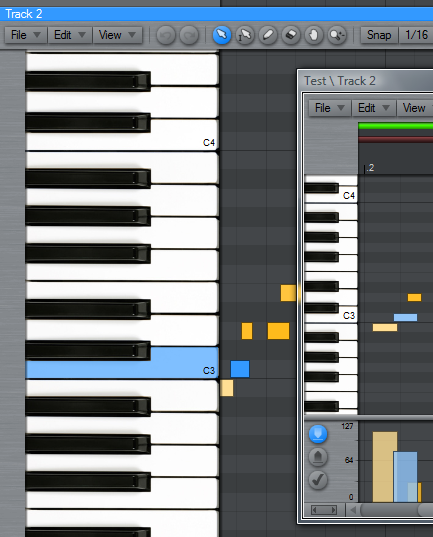
@Zynewave wrote:
Also remember the “select overlapping” command in the edit menu.
Er ah, Why? What does this do?
It selects any note events that overlaps other note events. You can use it to check if there are any overlapping, and then use delete to get rid of them.
ZynewaveKeymaster@LiquidProj3ct wrote:
Frits,
I just emailed you a pod file where Gladiator 2 responds to program changes. Try it!
Best regards
I’m afraid I can’t test it with the Gladiator2 demo.
ZynewaveKeymasterI just tested on my setup, and delay compensation of external hardware effects are working fine for me. I did not use Nebula3 in my master chain, but the SIR reverb, which adds ~200 ms latency.
Please send me your project file, so I can examine how you have set up your external reverb devices.
Have you verified that your soundcard mixer does not mix in the reverb return into the main mix?
ZynewaveKeymasterIf you haven’t modified the default setup, there should be an “event list” profile in the piano roll editor view menu. This event list does not have special editing features, so it is mostly usable for viewing existing events in list form.
Also remember the “select overlapping” command in the edit menu.
how much of the manual is actually correct at this point?
There are lot of minor feature additions that are not included in the guide, so that is why I’m hoping to do a complete revision of the guide this summer.
February 9, 2009 at 16:44 in reply to: Preview 2.08: Composite tracks (aka. multitake, comping) #14244