
Zynewave's Forum Page
Forum Replies Created
-
August 9, 2008 at 23:47 in reply to: Problems with playback of sysex dump from external hardware #13000
 ZynewaveKeymaster
Now that you’ve implemented drag and drop for .syx files, could you add them to the list of recognised files for the “List” window?
Done.
ZynewaveKeymaster- Mixer RMS/K-System meters and peak hold value options.
- Track menus and mixer controls for managing fader and meter pre/post positions.
- Numerous other usability improvements in the mixer.
- Track automatic solo mode.
August 9, 2008 at 11:28 in reply to: Problems with playback of sysex dump from external hardware #12995ZynewaveKeymasterTo be able to test your .syx file, I implemented support for dragging .syx files onto tracks. Coming up in release 2.04.
I could not provoke a crash with your syx file. I tried recording a sysex dump from my AN1x synth, and I found no problem here either. I’m thinking the crash problem must be related to how you have set up your devices/tracks. Please send me a project file saved just prior to the point where you would start recording the sysex.
ZynewaveKeymasterIt’s for the upcoming 2.04 release that the pan fader option is available. You must have confused it with the description of it in the 2.04 preview topic.
ZynewaveKeymasterThis is not possible with sound files on Podium tracks. There may be some VSTi sampler plugins which support browsing through different samples using program change, CC or other MIDI messages.
ZynewaveKeymaster@swindus wrote:
I have a problem with the parameter tracks in the current beta. I cannot move the faders of parameter tracks in the mixer. Anybody else noticed this?
Fixed last night. I’ve just uploaded beta6, which is the final beta. I’ve now completed my testing and bug-fixing. Please try this version and let me know if everything seems ok. This version now saves all the new settings to the pod file.
If everything is ok, I’ll release 2.04 this weekend.
ZynewaveKeymasterIf you don’t mind cheating a bit:
Using the param panel in the inspector, set up a Level (or Pan/Send) parameter track for your plugin. You should now have two parameter tracks under your plugin. Select the “Level” parameter track, locate the “WAH” parameter in the param list, right-click and select “Assign to this track”. You now have two WAH parameter tracks. You’ll notice that Podium automatically mutes the second WAH track because it would otherwise conflict with the first WAH track. But if you then manually mute the first WAH track, the second WAH track becomes active. You can use this procedure to switch between alternate automation tracks. Rather than muting/unmuting automation tracks, it may be easier to use the “move track” submenu and move the automation track you want to work with above the other automation tracks.
Some time in the future I may implement a dedicated multiple take option for parameter tracks.
ZynewaveKeymaster@ronin wrote:
Add a track and leave the metering options disabled.
1. The mixer panel doesn’t show the meter (thats right since we disabled the meter) but the arrangement panel does.
2. If I add an effect to that track the meter in the arrangment panel disappers but the context menu says it is enabled. (it can be reenabled by deactivating the fader and activating it again)Thanks for testing. Last night I fixed a bug related to the meters in the tracks region. I’ve just uploaded beta5, which has a lot of bug-fixes. Please try this and check if you still find meter inconsistencies.
ZynewaveKeymaster@Conquistador wrote:
Couple of things...instead of “Click to toggle pre/post fader” Maybe “Click anywhere in the Grid to toggle Pre post fader” is better. I see that as adding a bit more clarity and really finishing off a superb round of upgrades to the mixer.
As this is a text that is constantly shown in the popup, I’m looking for something that is briefer than the text you suggested. The popup would otherwise be twice the width.
Mixer header info: I still think it would give a user a really nice way to see what is in the mixer but without needing to have it visible all the time. Any reason why you think it is not a good idea? Only showing info for the focus track is an advantage surely if that is what the user has currently selected…no?
I just don’t think that the mixer title is a proper place to put this kind of info. I would hate having to constantly see this fader/meter info in the title when working in the timeline editors, where I’m not concerned with pre/post fader setup. Especially as the text would update whenever the track focus moves. It would draw my attention to irrelevant info.
ZynewaveKeymasterBeta4 is uploaded. I think I’m done with adding features for the 2.04 release. Still a couple of days remaining with testing and bug-fixing.
ZynewaveKeymasterHi,
There’s some info on license transfer at the bottom right of the purchase page.
Transfer of a license is allowed for free only once.
Frits
ZynewaveKeymaster@UncleAge wrote:
Is this still in the works?
I haven’t made any development on a zScope plugin. There are a good number of freeware analysis plugins available, so I think my time is better spent on Podium features. It still would be a nice project for the future, once the next 100 or so Podium features have been implemented.
ZynewaveKeymasterYou can increase the height of the timeline ruler region in the editor profile properties. That will give you more space to hit the cursor.
ZynewaveKeymasterSuggestion for a grid popup:
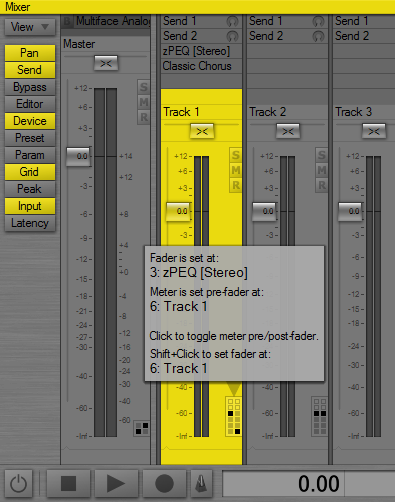
This popup will appear whenever the mouse is moved over one of the grids. What the screenshot does not show is that I’ve positioned the mouse over the bottom left block in the grid, which is why the text at the bottom of the popup says “set fader at” followed by the track name. Moving the mouse over the blocks will update the popup so that you can easily verify what action the shift+click will perform.
Also note that clicking anywhere in the grid now performs a simple pre/post switch of the meter. You need to shift-click to set the fader/meter to a specific position.
Comments?
ZynewaveKeymasterHmm, I don’t think this is something that fits in my quest for simplification of the UI. It can be a source for confusion if users experiment with the hide option without realizing exactly what it does, and I fear there would be support questions about the apparent “missing” devices that otherwise is present on the start page. The project templates (with the load setup command) was supposed to be a solution for the need to have alternative device layouts. Can’t you use the project/track templates for this purpose?