
Zynewave's Forum Page
Forum Replies Created
-
 ZynewaveKeymaster
Hi,
Are you trying to bounce record in realtime, or bounce render offline?
Do you have any Jamstix MIDI tracks in addition to the four stereo outs?
You can get Podium to record the MIDI output of a plugin by enabling the “Enable recording of VST plugin MIDI output” option in preferences. This option is off by default, because some plugins will send MIDI input thru to the output, causing duplicate notes when recording over an existing sequence.
ZynewaveKeymasterRather than creating a new preview topic, I’ll just add the post to this topic. 2.30 beta1 is available in the VIP lounge:
• Added “snap to grid”, “snap relative to grid” and “snap to edit cursor” options to the editor snap menu. All options can be enabled at the same time, making snapped position dependant on which snap point is closest.
• Modified the way that the Shift, Ctrl and Alt keys affect mouse drag actions. Pressing the Shift key after starting a timeline drag action will temporarily disable snapping. Pressing the Alt key after starting an event drag action will lock the dragged selection in either the horizontal or vertical position.
• Dragging phantom copies in the arrangement editor is now done with the Ctrl key instead of the Alt key. The phantom copy can subsequently be converted to a unique copy with the edit menu or the Ctrl+U shortcut.
• Pressing the Ctrl key when drawing a curve, or when dragging a single point event in the curve editor, will snap the point to the default parameter value. This was previously done with the Alt key.
• Renamed the Quantize menu to “Grid & Snap” menu. Shortcut key is Alt+G (previously Alt+Q).
• Changed the shortcut key for toggling snap mode to A (previously T).
• Modified the behaviour of the Q/W key shortcuts: Q/W moves the edit cursor in steps of the grid value. Shift+Q/W steps the edit cursor between marker events and active loop, punch and segment ranges. Ctrl+Q/W will set the edit cursor to the start or end of the current event selection.
• Added Ctrl+E as shortcut for the “link edit cursor to play cursor” option.
• Added Ctrl+R as shortcut for resetting current event/segment selection.
• Added Ctrl+U as shortcut for converting a sequence/sound event to a unique copy.
• When a track event is selected, the Left Arrow key navigation will stop at the first event on the track, instead of selecting the track.
• Middle-click on the timeline will set the edit cursor snapped. Holding Shift while clicking will set the edit cursor without snapping.
• Added an extra decimal digit to plugin parameter value readouts in the curve editor and the mixer parameter faders.
• Fix: Unassigning an instrument from a track which had MIDI parameter tracks would cause a crash.
Let me know if you find any conflicts in the changes to the Shift, Ctrl and Alt key behaviour. I hope to release 2.30 this weekend.
May 13, 2010 at 19:48 in reply to: Why do electronic musicians keep using Logic and FL Studio? #18127ZynewaveKeymaster@tumult wrote:
Would it be possible to associate events to markers, so that when I click a marker, it automatically selects some events in the timeline?
You can do that already with the bundle events command. Select all events you want linked (you can include the marker event if you like), and then “Bundle events” (Ctrl+N). Dragging any of the events in the bundle will then drag all the bundled events, and you can use the copy drag to create phantom copies. The dropped copy will become a new bundle. Use Ctrl+N again to unbundle events.
The bundling feature also allows you to create separate bundles for handling synths and drums, as in your example. Each event can only be included in a single bundle though, so the marker event cannot be included in more than one bundle.
To further explain the idea with marker linking:
Say you have 4 copies of a 4-bar section, each with a marker event at the start. You can link the 4 marker events to sync the 4-bar patterns. You could however instead link only the first and third marker, and by doing so sync two 8-bar sections. In other words, the length of the synced sections are not determined by the distance between markers, but the minimum distance between linked markers.May 13, 2010 at 14:34 in reply to: Why do electronic musicians keep using Logic and FL Studio? #18122ZynewaveKeymasterOh, and while I remember it. Speaking about markers:
Some day I’ll extend the markers to have a collapse button, like the circular one used on group tracks. That can be used to collapse part of the timeline that you don’t work on currently.
May 13, 2010 at 14:00 in reply to: Why do electronic musicians keep using Logic and FL Studio? #18121ZynewaveKeymasterThanks for the input, tumult.
@tumult wrote:
In Logic, I can put the entire chorus (even though it’s made up of multiple clips across multiple, unrelated tracks) inside of a single clip, except for the one part that will be different between the two copies, the drum fill. So picture this: the entire chorus inside of one clip, and the two drum fills that are different outside of that clip in their own separate clip. Now I can make a phantom copy of the entire chorus, except for the drum fill, which is exactly what I want.
Does that make sense? It’s kind of hard to explain with words.
I think I understand. Basically you want a phantom copy feature for a selection of track events within a section of the timeline.
As I understand it: The feature you talk about here, does not actually reduce the number of tracks needed in the arrangement. Instead it requires an additional track for placing the folder clips/events that will be the link to the other layer of clips. It is not a tool to play layered sequences, as overlapping sequences will cut out each other. It is an organizational tool for syncing the arrangement of clips within a section on the timeline, and having changes made in one section appear automatically in phantom sections.
About the track overview: If your composition style involves having hundreds of tracks that each contain microscopic components, then I think the Podium track tags and nestable group tracks are a helpful tool for keeping an overview of the tracks.
To make something like this fit into the Podium track structure, I would experiment with extending the use of marker events, instead of adding a new folder event type. I could add a feature to link marker events together, so that any edits made within one marker section will automatically be replicated in the other linked marker sections. For example: If you have four repeated sections, each divided with a marker at the start of the section, you’d select all four markers, use the link command (button or menu), and then any edits to a section that is identical in the other sections, will be replicated. This means edits to phantom sequence events (the actual sequence event and not just the contents of the phantom sequence) or adding new events will be replicated. Changes made to unique events that are not part of the other sections will not be replicated. That should allow you to make synced edits to section repetitions, while still having unique fills in the individual sections that will not be affected by the edits.
That could actually work quite well, I think :-k . And it would not require changes to the Podium engine in any way. This is entirely a UI tool for managing repeated patterns on the timeline.
ZynewaveKeymasterThe access to the drum map editor is indeed not obvious. This is something I plan to redesign later this year. My idea so far is to add some commands to the track menu that can help activating drum map mode for the track, so you don’t need to set the drum kit option in the preset properties. More about that later in the year.
ZynewaveKeymaster@kyran wrote:
Lets take ctrl+drag and alt+drag as an example. I think most people will have a preference to either phantom copies or hard copies depending on the sort of work they do most of the time. (I find myself using phantom copies most of the time and am happy to use the right click menu to make a phantom copy unique) This would free up the ctrl modifier for my usecase.
Thanks for the input. I also almost exclusively use the phantom copying, so your suggestion made me think of another solution:
Dragging with the control key will make phantom copies. I’ll add Ctrl+Q as a shortcut for converting a phantom to a unique copy. Thus, after you have dragged a phantom copy with Ctrl held down, it’s a quick tap on the Q key to convert it to a unique copy. That frees up the Alt key to be used for the drag x/y locking, and the Shift key can then exclusively be used for overriding snap mode. No need for the Shift key option in the snap menu. This will work across all editors.
ZynewaveKeymasterIf you drag a MIDI file to an instrument track, it only imports the first note sequence from the MIDI file. Drag the file to a parameter track, and it imports the first control change sequence in the MIDI file.
If you want to import full arrangements, have a look at this tutorial video:
ZynewaveKeymaster@Trancit wrote:
Couldn´t you implement something like this, I personally think, that would be very helpfull, especially sending midifile data to the selected track…
As I wrote in my reply further up this page, the auto-audition option is a good idea and will likely appear in the near future. Auditioning MIDI files is also something that I will implement later on. There already is an option for syncing audio file audition to bar starts during playback, so that will also apply to MIDI files.
ZynewaveKeymasterI’m sorry you lost some work. It is likely that the crash is caused by a plugin. However, those crashes can normally be avoided by bypassing all plugins before you activate power/play. You say that it still crashed when all plugins were bypassed, which puzzles me.
Deleting a plugin from a track, and then undoing the delete, will currently not restore the preset data. That is a flaw in Podium, and something I’ll fix in the future.
ZynewaveKeymaster@LiquidProj3ct wrote:
I’d like to report a bad behavior timming notes: When you undo timming notes only the selected note is undoed. I hope it helps 🙂
That is on purpose. As with all editing commands, only selected events are affected. If you want to revert the timing of all notes, select all, before using the command.
ZynewaveKeymasterFrom the kvr database, I can see that Ugo Rez is made with SynthEdit. Unfortunately there is a common problem with many SynthEdit made plugins, that causes crashes when using more than one instance with multiprocessing. This occurs in most hosts. You can try to disable the “multiprocessing” option in Podium preferences to check this. I think that the most recent SynthEdit update had a fix for this problem, so perhaps once the Ugo developer rebuild the plugin, the crash problem will be fixed.
ZynewaveKeymaster@LiquidProj3ct wrote:
@thcilnnahoj wrote:
I also LOVE the right-click cancel action, and wouldn’t want to be without it! 8)
I start to see it useful too. Middle click while dragging is the way, well, I think 😉 it doesn’t do nothing (while dragging), right?
Middle-clicking on the timeline area sets the position of the edit cursor. On my mouse the middle-click is done by pressing down the mouse-wheel. It’s hard to do this without accidentally scrolling the wheel, so I wouldn’t be comfortable with using middle-click for often used actions.
Anyway, I think I’ve come up with a solution that pleases all:
The old quantize menu (now renamed to grid/snap menu, shortcut Alt+G) is extended with the options: “Absolute Snap to Grid”, “Relative Snap to Grid” and “Use Shift Key to Override Snap”. Thus you can select whether you want the shift key for overriding snap, or for the old default x/y drag lock. These options are set for each editor.
ZynewaveKeymaster@LiquidProj3ct wrote:
maybe please consider this alternative to ignore snap: Left click on the note (or borders) and while you keep down left mouse button you press right click button. While you’re dragging anything you can turn on/off snap ultrafast with right click. I think is very cool 😉
Right-clicking while dragging will cancel any drag operation. That shortcut is used all over the Podium UI. I use it constantly when e.g. zooming in to temporarily check details, and testing changes to parameters etc.
ZynewaveKeymasterJust a quick halfdone mockup to illustrate my idea:
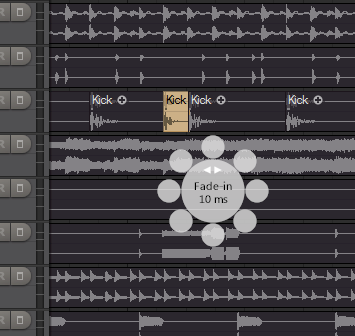
The small outer circles would contain an icon that illustrates the action. Upper half, left to right, would be: Resize start, fade-in, gain, fade-out, resize end. Moving the mouse over the small circles will show detailed info text in the center circle.
So, it can be used both as a quick way to get info about the properties of the event, as well as an easy access to drag adjusting the properties. It can be useful when the normal drag handles on the event are hard to access, such as when zoomed far out, as in the screenshot, and when zoomed far in so that the handles on the event may be outside the display range.