
Zynewave's Forum Page
Forum Replies Created
-
 ZynewaveKeymaster
@pj geerlings wrote:
Is it now possible to chain a VST Instrument to a VST Effect on the same Podium channel and route MIDI conntrol to both the Instrument and Effect from the same MIDI keyboard?
Are you referring to the discussion we had here?
http://www.zynewave.com/forum/viewtopic.php?t=1096I don’t think I’ve made changes to the way input mappings are handled since this discussion.
ZynewaveKeymasterThe .pod file format has been updated many times. If you try to load a new .pod file on an older Podium release you may get an error message saying that the file format is from a newer Podium version, but you’ll always be able to load older .pod files in newer Podium releases.
In the future there may be updates to the way hardware devices are handled in Podium, but I don’t see a need to change something that would corrupt older hardware device setups.
ZynewaveKeymasterThere most likely will be a 64-bit version of Podium at some point. At the moment though I see no need to devote development time on it, until 64-bit Windows gains a larger marketshare. Users have reported that Podium runs fine under 64-bit Windows.
ZynewaveKeymaster@swindus wrote:
One thing I have found while using a MCU: Changing the fader position with the grid does not work correctly with a MCU. The MCU controls only the top most fader of the effect chain. After switching to another fader in the chain the MCU fader controls nothing.
The current Mackie Control implementation was made before the compact track layout mode was implemented. I have a long list of improvements I would like to make to the MCU support, but I would like to wait with those until I have completed the compact mode feature set, and have removed the expanded mode option.
ZynewaveKeymaster@thcilnnahoj wrote:
A find: The track panel in the inspector displays normal sliders even when set to readout sliders.
It was on purpose that I left these sliders use the non-readout style. After thinking about it, I agree that it is more consistent if these sliders use the readout style as well. I changed this and it will be available in 2.06.
ZynewaveKeymaster@druid wrote:
I can now double-click Podium files without it “installing”. If you go to the filetypes dialog (in explorer or my computer) and then find .pod and edit the open action, you’ll see it uses “DDE”.
I vaguely remember seeing those options once, but I can’t seem to find these now on Vista. All I can find is a window to assocate extensions with applications, but no further options. Anyone know if the DDE settings are still available in Vista?
And couldn’t you, in your installer, tell Windows to associate the filetype just how you want? I don’t know, I never got into that side of programming/developing, but surely people do it. Maybe it’s a limitation with the .msi format? No idea myself.
I checked the installer tool, and I can’t specify any settings related to this. It’s possible that a more advanced installer tool allows the developer to control this behaviour.
ZynewaveKeymasterSorry for the delayed response. I wanted to get the 2.05 release out of the way first.
I tried what you described, and can confirm that double-clicking a .pod file will restore the “Zynewave Podium Projects” folder if it has been deleted. Loading a project file from the Podium UI does not have this problem.
This is actually not an action performed by Podium. It is Windows that starts up the Podium installer to repair the missing files. I checked my installer compilation tool and found no way to specify that this action should not be performed.
One way to solve this is to remove the example project files from the installer, and also skip the creation of the projects folder by the installer. The example projects can then be downloaded in a separate zip file. The Podium startup can check for the presence of a valid projects folder, and if not found, prompt the user if the default folder should be created. The downside of this approach is that this default folder then won’t be removed if you uninstall Podium.
Any alternative suggestions?
ZynewaveKeymasterI’ve added a “none” option to the “control type” combobox in the tracks region properties. This will hide all gain, pan and send controls from the track headers. Coming in release 2.06.
ZynewaveKeymasterCompare the properties between your “M4U MIDI 1” and “M4U MIDI 2” mappings. There must be some setting in MIDI 1 that should be cleared. Check that you have left the audio interface setting to
as well. ZynewaveKeymaster- Vertical meters on track headers.
- Configurable dial, slider and readout slider styles in the inspector, track headers and mixer.
ZynewaveKeymasterAmusing 🙂
It’s so over the top that I don’t even feel offended.
I didn’t find any constructive suggestions in the post, so I took the liberty of moving this topic from the Future forum to the General Chat forum.
ZynewaveKeymasterPerhaps you could keep two setup files, with the only difference that one setup file has all the interfaces deselected. You can then switch between setups by loading or dragging a setup file onto the Podium window, and thereby enable/disable the interfaces.
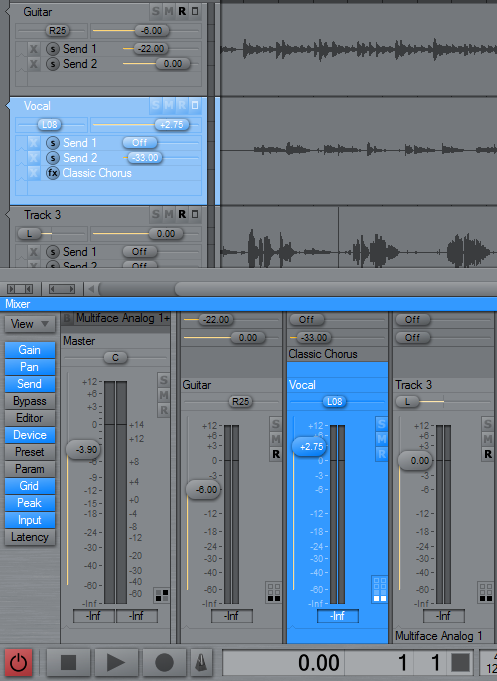
September 20, 2008 at 22:58 in reply to: Restricted to Podium license ownersZynewaveKeymasterThis content is restricted to Podium license owners.September 20, 2008 at 01:37 in reply to: Preview 2.05: Track header and inspector improvements #13180ZynewaveKeymasterI agree that the tiny font used on the readout sliders are of little use when it’s hard to read. I’ve tried using a slightly larger font, as seen on the screenshot below. To be consistent with the track header sliders I’ve also added the missing dB decimal to the gain faders in the mixer strips.
Is this good enough to be the new default Podium setup?
 ZynewaveKeymaster
I have now tested with ASIO4ALL v2.8, and I can find no problems. I tried with various buffer sizes, and with both my RME interface and the internal PC soundcard.
Have you tried the latest A4A 2.9 beta?
You mentioned that you were able to record the static Podium outputs through Reaper. Can you post/send a wav of that?
It will also be a help if you can email me the project file you use to record the static problem.
Also, please post/send the Podium interface report for your ASIO4ALL settings.